

- Who this helps
- DMC operations managers, coordinators, dispatchers and reservations teams.
- What you can do
- Use the prompts to structure operating briefs, expose missing inputs and prepare handovers for human verification in approved systems.
#Target audience
DMC operations managers, coordinators, dispatchers, reservations teams, duty managers, guide supervisors and transport controllers.
This is a working guide for people who already understand that tourism is delivered through connected handovers. The prompts are designed to improve preparation, consistency and visibility; they do not transfer authority from the trained employee to the AI system.
#Why this topic matters in tourism
A DMC operations desk turns bookings into coordinated movements across people, vehicles, attractions, meals and suppliers. The work is time-sensitive and exception-heavy. AI can help organise information and expose gaps, but it cannot confirm a supplier, allocate an unavailable person or approve an operational risk.
The prompts follow the daily DMC control cycle: review the tour file, confirm resources, prepare the movement, monitor exceptions, hand over unresolved items and close the day with evidence. They use AI for structure and analysis while keeping the live operation in approved systems and human hands.
AI may organise information and propose a structure. It must not manufacture the confirmed operational reality. When the source of truth changes, the employee must update the inputs and verify the output again.
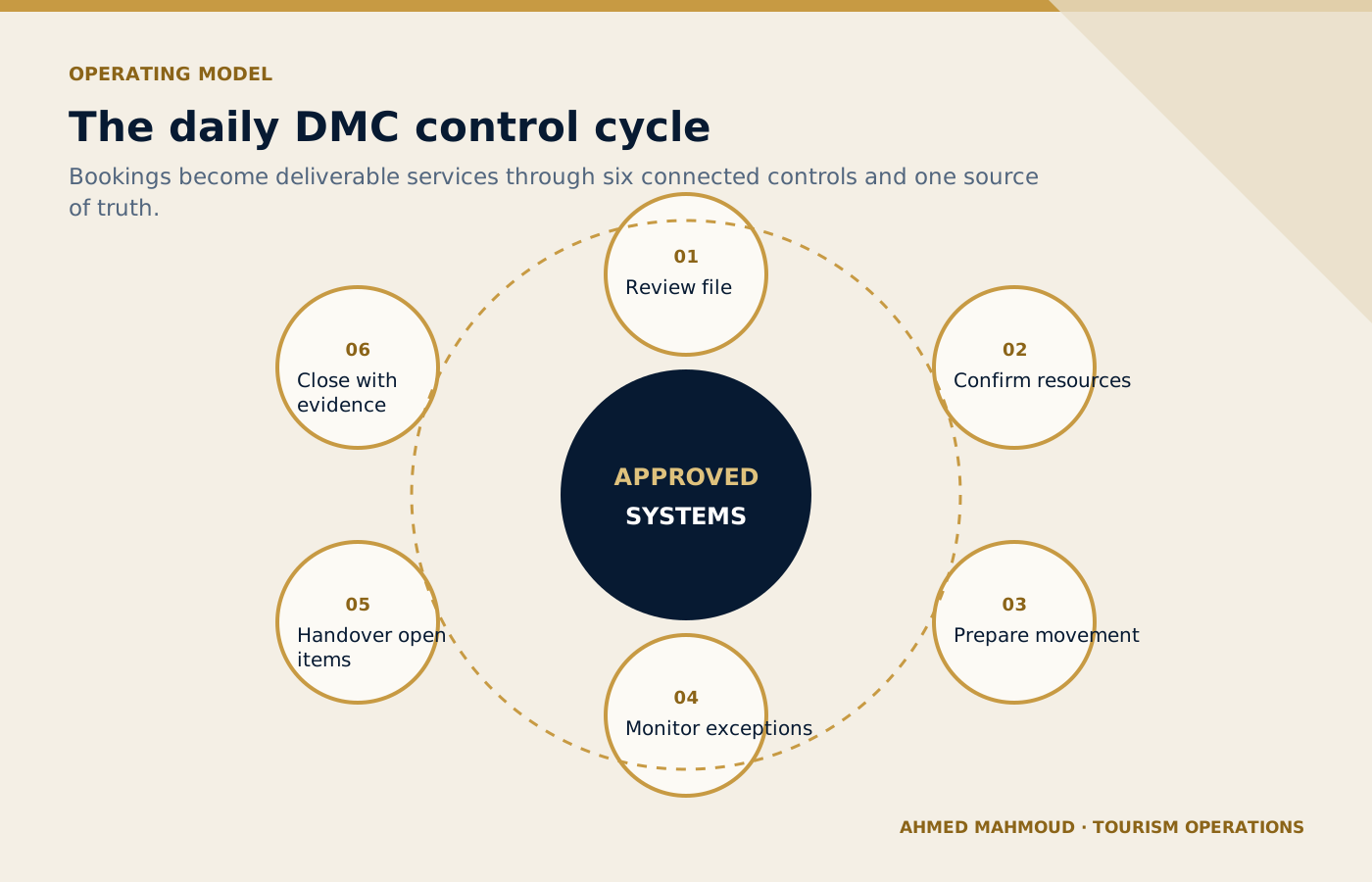
The daily control cycle keeps live operations attached to approved systems and an accountable operations team.
On small screens, scroll the diagram horizontally to read its labels.
#Responsible AI rules for this toolkit
- Use the booking system, supplier confirmations and duty log as the source of truth.
- Remove unnecessary guest personal data before using AI.
- Do not treat a generated assignment as a confirmed allocation.
- Show conflicts, missing data and assumptions in separate sections.
- Require duty-manager approval for decisions that change service, cost, safety or guest commitments.
Companies should adapt these rules to approved tools, information-security controls, local law, supplier contracts and internal authority. When the implications are legal, privacy-related or cybersecurity-related, qualified specialists should be consulted.
#The TRAVEL prompting framework
Every template in this playbook follows one memorable structure. The aim is not to make prompts longer for their own sake. It is to place the information, controls and approval points that a tourism professional needs in the right order.
state the professional perspective and the business decision to support.
include the destination, service type, timing, guest journey stage and confirmed constraints.
define the guest or client profile and provide only verified, permitted information.
require source labels, assumptions, uncertainty flags and a check against official or approved records.
specify the exact structure, priority order, tone, length and escalation path.
prohibit invention, protect data and identify who approves the final output.
In one sentence: a professional tourism prompt identifies the task, supplies the real operating context, defines the audience and approved inputs, demands a verifiable structure, explains exceptions and keeps privacy plus final authority with a human.
#Ten professional prompt templates
Each prompt contains editable placeholders and a built-in stop rule for missing information. Copy it, replace the placeholders with approved facts and keep the verification and human-approval sections intact. The templates are intentionally detailed because the omitted detail is often where a tourism failure begins.
#Daily Operations Briefing
Create an exception-first briefing from confirmed movements and resource data.
#When to use it
Use it for a controlled draft before information reaches a guest, supplier, colleague or manager.
#Required inputs
- date
- movements
- guest counts
- pickup windows
- guides
- drivers
- vehicles
- tickets
- suppliers
- alerts
- duty contacts
Illustrative scenarioWorked example: Daily Operations Briefing
Operational teaching scenario, not a documented incident. Uncited figures and outcomes are illustrative assumptions.
- Situation
Example: A DMC has twelve movements, two language requests and one pending attraction slot.
- Evidence
Check the supplied date, movements, guest counts, pickup windows, guides. Treat scenario inputs as assumptions until confirmed against approved records.
- Decision
Decide whether the inputs are complete and the task is authorised. If not, request the missing information before using the prompt.
- Action
Prepare the daily operations briefing draft from the checked inputs; keep unresolved facts and required approvals visible.
- Verification
Compare the draft with the source records and expected outputs. The named accountable owner must verify and approve it before live use.
#Complete prompt
ROLE
Act as a DMC duty manager in a professional tourism organisation.

TASK
Create an exception-first briefing from confirmed movements and resource data.

CONTEXT
Destination/service: [Insert confirmed details]
Date, operating stage and guest/client profile: [Insert approved information]
Sources of truth: [List approved systems, confirmations, SOPs or official sources]

INPUTS
Provide: date; movements; guest counts; pickup windows; guides; drivers; vehicles; tickets; suppliers; alerts; duty contacts.
If an essential input is missing, contradictory or unconfirmed, stop and list what is required, its owner and source. Do not guess.

OUTPUT
Return: priority overview; movement table; unresolved confirmations; timing conflicts; risk actions; owner matrix. Separate confirmed facts, assumptions, recommendations and pending items. Label dynamic facts with their source and verification date when supplied.

LIMITS
Do not confirm resources or timings that are not marked confirmed.

PRIVACY AND APPROVAL
Exclude unnecessary personal data, identity or payment details, confidential rates, contracts and security information. Finish with verification actions, unresolved questions and the final approver’s role. The output remains a draft until that person checks it against approved sources.
#Expected output
- priority overview
- movement table
- unresolved confirmations
- timing conflicts
- risk actions
- owner matrix
Human verification
Professional tourism trainer’s noteReplace every placeholder and keep unresolved items visible until an authorised professional reviews them.
#Tour-File Review
Review a tour file for completeness, contradictions and delivery risk.
#When to use it
Use it for a controlled draft before information reaches a guest, supplier, colleague or manager.
#Required inputs
- booking extract
- itinerary
- vouchers
- pickup details
- guest needs
- tickets
- supplier confirmations
- commercial notes permitted
- SOP
Illustrative scenarioWorked example: Tour-File Review
Operational teaching scenario, not a documented incident. Uncited figures and outcomes are illustrative assumptions.
- Situation
Example: A multi-day group file is transferred from reservations to operations 72 hours before arrival.
- Evidence
Check the supplied booking extract, itinerary, vouchers, pickup details, guest needs. Treat scenario inputs as assumptions until confirmed against approved records.
- Decision
Decide whether the inputs are complete and the task is authorised. If not, request the missing information before using the prompt.
- Action
Prepare the tour-file review draft from the checked inputs; keep unresolved facts and required approvals visible.
- Verification
Compare the draft with the source records and expected outputs. The named accountable owner must verify and approve it before live use.
#Complete prompt
ROLE
Act as a senior DMC operations auditor in a professional tourism organisation.

TASK
Review a tour file for completeness, contradictions and delivery risk.

CONTEXT
Destination/service: [Insert confirmed details]
Date, operating stage and guest/client profile: [Insert approved information]
Sources of truth: [List approved systems, confirmations, SOPs or official sources]

INPUTS
Provide: booking extract; itinerary; vouchers; pickup details; guest needs; tickets; supplier confirmations; commercial notes permitted; SOP.
If an essential input is missing, contradictory or unconfirmed, stop and list what is required, its owner and source. Do not guess.

OUTPUT
Return: critical gaps; inconsistencies; guest-impact risks; questions by owner; release status. Separate confirmed facts, assumptions, recommendations and pending items. Label dynamic facts with their source and verification date when supplied.

LIMITS
Do not expose payment data or infer missing services from package names.

PRIVACY AND APPROVAL
Exclude unnecessary personal data, identity or payment details, confidential rates, contracts and security information. Finish with verification actions, unresolved questions and the final approver’s role. The output remains a draft until that person checks it against approved sources.
#Expected output
- critical gaps
- inconsistencies
- guest-impact risks
- questions by owner
- release status
Human verification
Professional tourism trainer’s noteReplace every placeholder and keep unresolved items visible until an authorised professional reviews them.
#Guide and Driver Assignment
Produce a ranked assignment recommendation based on confirmed capability and constraints.
#When to use it
Use it for a controlled draft before information reaches a guest, supplier, colleague or manager.
#Required inputs
- operations list
- available staff
- language
- licences
- product competence
- location
- working hours
- vehicle class
- conflicts
- priorities
Illustrative scenarioWorked example: Guide and Driver Assignment
Operational teaching scenario, not a documented incident. Uncited figures and outcomes are illustrative assumptions.
- Situation
Example: A French guide is needed on Yas Island while another operation requires off-road competence.
- Evidence
Check the supplied operations list, available staff, language, licences, product competence. Treat scenario inputs as assumptions until confirmed against approved records.
- Decision
Decide whether the inputs are complete and the task is authorised. If not, request the missing information before using the prompt.
- Action
Prepare the guide and driver assignment draft from the checked inputs; keep unresolved facts and required approvals visible.
- Verification
Compare the draft with the source records and expected outputs. The named accountable owner must verify and approve it before live use.
#Complete prompt
ROLE
Act as a DMC assignment controller in a professional tourism organisation.

TASK
Produce a ranked assignment recommendation based on confirmed capability and constraints.

CONTEXT
Destination/service: [Insert confirmed details]
Date, operating stage and guest/client profile: [Insert approved information]
Sources of truth: [List approved systems, confirmations, SOPs or official sources]

INPUTS
Provide: operations list; available staff; language; licences; product competence; location; working hours; vehicle class; conflicts; priorities.
If an essential input is missing, contradictory or unconfirmed, stop and list what is required, its owner and source. Do not guess.

OUTPUT
Return: constraint check; ranked options; conflicts; rationale; unassigned operations; approval table. Separate confirmed facts, assumptions, recommendations and pending items. Label dynamic facts with their source and verification date when supplied.

LIMITS
A recommendation is not a confirmed assignment. Never override legal hours, licences or availability.

PRIVACY AND APPROVAL
Exclude unnecessary personal data, identity or payment details, confidential rates, contracts and security information. Finish with verification actions, unresolved questions and the final approver’s role. The output remains a draft until that person checks it against approved sources.
#Expected output
- constraint check
- ranked options
- conflicts
- rationale
- unassigned operations
- approval table
Human verification
Professional tourism trainer’s noteReplace every placeholder and keep unresolved items visible until an authorised professional reviews them.
#Supplier Confirmation Checklist
Build a service-specific confirmation checklist and follow-up tracker.
#When to use it
Use it for a controlled draft before information reaches a guest, supplier, colleague or manager.
#Required inputs
- service type
- booking details
- supplier
- contracted inclusions
- service date
- contact channel
- cut-off
- special requirements
Illustrative scenarioWorked example: Supplier Confirmation Checklist
Operational teaching scenario, not a documented incident. Uncited figures and outcomes are illustrative assumptions.
- Situation
Example: Operations needs final confirmation from a restaurant and attraction for a 40-person group.
- Evidence
Check the supplied service type, booking details, supplier, contracted inclusions, service date. Treat scenario inputs as assumptions until confirmed against approved records.
- Decision
Decide whether the inputs are complete and the task is authorised. If not, request the missing information before using the prompt.
- Action
Prepare the supplier confirmation checklist draft from the checked inputs; keep unresolved facts and required approvals visible.
- Verification
Compare the draft with the source records and expected outputs. The named accountable owner must verify and approve it before live use.
#Complete prompt
ROLE
Act as a supplier coordination supervisor in a professional tourism organisation.

TASK
Build a service-specific confirmation checklist and follow-up tracker.

CONTEXT
Destination/service: [Insert confirmed details]
Date, operating stage and guest/client profile: [Insert approved information]
Sources of truth: [List approved systems, confirmations, SOPs or official sources]

INPUTS
Provide: service type; booking details; supplier; contracted inclusions; service date; contact channel; cut-off; special requirements.
If an essential input is missing, contradictory or unconfirmed, stop and list what is required, its owner and source. Do not guess.

OUTPUT
Return: confirmation message; checklist; pending items; deadline; escalation trigger; evidence field. Separate confirmed facts, assumptions, recommendations and pending items. Label dynamic facts with their source and verification date when supplied.

LIMITS
Do not insert rates or terms that were not supplied and authorised.

PRIVACY AND APPROVAL
Exclude unnecessary personal data, identity or payment details, confidential rates, contracts and security information. Finish with verification actions, unresolved questions and the final approver’s role. The output remains a draft until that person checks it against approved sources.
#Expected output
- confirmation message
- checklist
- pending items
- deadline
- escalation trigger
- evidence field
Human verification
Professional tourism trainer’s noteReplace every placeholder and keep unresolved items visible until an authorised professional reviews them.
#Missing Booking Information Detection
Detect missing booking information before operational release.
#When to use it
Use it for a controlled draft before information reaches a guest, supplier, colleague or manager.
#Required inputs
- tour file
- mandatory-field standard
- itinerary
- guest requirements
- supplier status
- internal notes
Illustrative scenarioWorked example: Missing Booking Information Detection
Operational teaching scenario, not a documented incident. Uncited figures and outcomes are illustrative assumptions.
- Situation
Example: A private transfer file has flight number but no terminal, contact method or child-seat confirmation.
- Evidence
Check the supplied tour file, mandatory-field standard, itinerary, guest requirements, supplier status. Treat scenario inputs as assumptions until confirmed against approved records.
- Decision
Decide whether the inputs are complete and the task is authorised. If not, request the missing information before using the prompt.
- Action
Prepare the missing booking information detection draft from the checked inputs; keep unresolved facts and required approvals visible.
- Verification
Compare the draft with the source records and expected outputs. The named accountable owner must verify and approve it before live use.
#Complete prompt
ROLE
Act as a DMC reservations-to-operations controller in a professional tourism organisation.

TASK
Detect missing booking information before operational release.

CONTEXT
Destination/service: [Insert confirmed details]
Date, operating stage and guest/client profile: [Insert approved information]
Sources of truth: [List approved systems, confirmations, SOPs or official sources]

INPUTS
Provide: tour file; mandatory-field standard; itinerary; guest requirements; supplier status; internal notes.
If an essential input is missing, contradictory or unconfirmed, stop and list what is required, its owner and source. Do not guess.

OUTPUT
Return: stop-release items; high-priority gaps; lower-priority questions; owner; required-by time. Separate confirmed facts, assumptions, recommendations and pending items. Label dynamic facts with their source and verification date when supplied.

LIMITS
Do not fill gaps with typical values or past booking patterns.

PRIVACY AND APPROVAL
Exclude unnecessary personal data, identity or payment details, confidential rates, contracts and security information. Finish with verification actions, unresolved questions and the final approver’s role. The output remains a draft until that person checks it against approved sources.
#Expected output
- stop-release items
- high-priority gaps
- lower-priority questions
- owner
- required-by time
Human verification
Professional tourism trainer’s noteReplace every placeholder and keep unresolved items visible until an authorised professional reviews them.
#Daily Movement Planning
Turn confirmed services into a coordinated movement plan with handovers and buffers.
#When to use it
Use it for a controlled draft before information reaches a guest, supplier, colleague or manager.
#Required inputs
- service list
- locations
- confirmed times
- pickup windows
- resources
- tickets
- meal slots
- access rules
- buffers
- constraints
Illustrative scenarioWorked example: Daily Movement Planning
Operational teaching scenario, not a documented incident. Uncited figures and outcomes are illustrative assumptions.
- Situation
Example: An incentive group splits into two activities and reunites for dinner.
- Evidence
Check the supplied service list, locations, confirmed times, pickup windows, resources. Treat scenario inputs as assumptions until confirmed against approved records.
- Decision
Decide whether the inputs are complete and the task is authorised. If not, request the missing information before using the prompt.
- Action
Prepare the daily movement planning draft from the checked inputs; keep unresolved facts and required approvals visible.
- Verification
Compare the draft with the source records and expected outputs. The named accountable owner must verify and approve it before live use.
#Complete prompt
ROLE
Act as a destination operations planner in a professional tourism organisation.

TASK
Turn confirmed services into a coordinated movement plan with handovers and buffers.

CONTEXT
Destination/service: [Insert confirmed details]
Date, operating stage and guest/client profile: [Insert approved information]
Sources of truth: [List approved systems, confirmations, SOPs or official sources]

INPUTS
Provide: service list; locations; confirmed times; pickup windows; resources; tickets; meal slots; access rules; buffers; constraints.
If an essential input is missing, contradictory or unconfirmed, stop and list what is required, its owner and source. Do not guess.

OUTPUT
Return: chronological movement board; resource view; handovers; critical path; contingency notes; approval fields. Separate confirmed facts, assumptions, recommendations and pending items. Label dynamic facts with their source and verification date when supplied.

LIMITS
Travel times and access must be supplied or marked for external verification.

PRIVACY AND APPROVAL
Exclude unnecessary personal data, identity or payment details, confidential rates, contracts and security information. Finish with verification actions, unresolved questions and the final approver’s role. The output remains a draft until that person checks it against approved sources.
#Expected output
- chronological movement board
- resource view
- handovers
- critical path
- contingency notes
- approval fields
Human verification
Professional tourism trainer’s noteReplace every placeholder and keep unresolved items visible until an authorised professional reviews them.
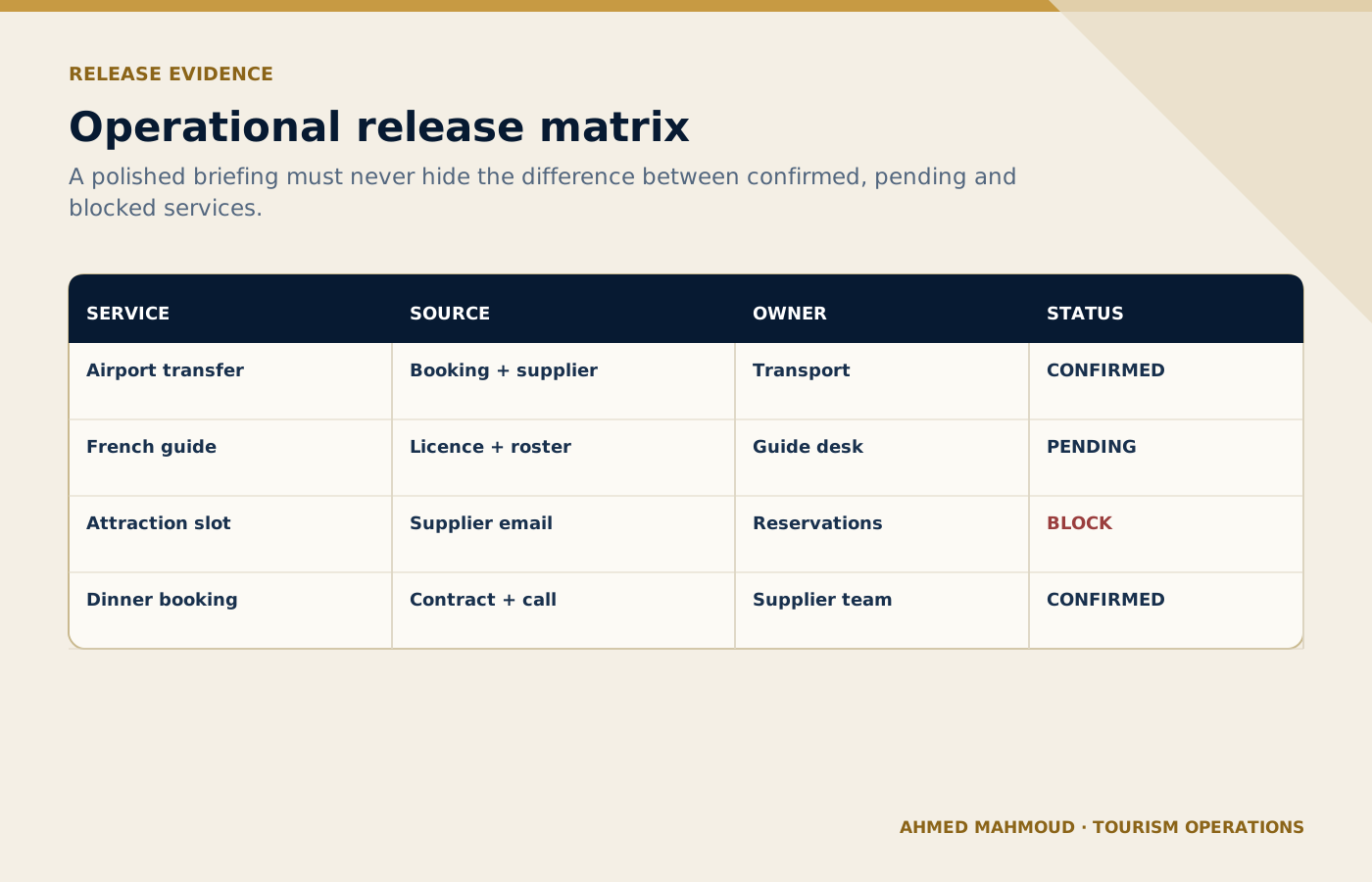
Release status must distinguish confirmed services from pending actions and genuine blockers.
On small screens, scroll the diagram horizontally to read its labels.
#Operational Risk Assessment
Assess a day of operations using likelihood, impact, detectability and control readiness.
#When to use it
Use it for a controlled draft before information reaches a guest, supplier, colleague or manager.
#Required inputs
- movement plan
- guest profile
- weather and event alerts
- suppliers
- resources
- known issues
- contingency
- escalation
Illustrative scenarioWorked example: Operational Risk Assessment
Operational teaching scenario, not a documented incident. Uncited figures and outcomes are illustrative assumptions.
- Situation
Example: A desert operation faces high temperature, a late flight and limited backup vehicles.
- Evidence
Check the supplied movement plan, guest profile, weather and event alerts, suppliers, resources. Treat scenario inputs as assumptions until confirmed against approved records.
- Decision
Decide whether the inputs are complete and the task is authorised. If not, request the missing information before using the prompt.
- Action
Prepare the operational risk assessment draft from the checked inputs; keep unresolved facts and required approvals visible.
- Verification
Compare the draft with the source records and expected outputs. The named accountable owner must verify and approve it before live use.
#Complete prompt
ROLE
Act as a tourism operations risk facilitator in a professional tourism organisation.

TASK
Assess a day of operations using likelihood, impact, detectability and control readiness.

CONTEXT
Destination/service: [Insert confirmed details]
Date, operating stage and guest/client profile: [Insert approved information]
Sources of truth: [List approved systems, confirmations, SOPs or official sources]

INPUTS
Provide: movement plan; guest profile; weather and event alerts; suppliers; resources; known issues; contingency; escalation.
If an essential input is missing, contradictory or unconfirmed, stop and list what is required, its owner and source. Do not guess.

OUTPUT
Return: risk register; top risks; preventive controls; trigger points; owners; residual risk. Separate confirmed facts, assumptions, recommendations and pending items. Label dynamic facts with their source and verification date when supplied.

LIMITS
Do not down-score a risk because a control is only planned rather than confirmed.

PRIVACY AND APPROVAL
Exclude unnecessary personal data, identity or payment details, confidential rates, contracts and security information. Finish with verification actions, unresolved questions and the final approver’s role. The output remains a draft until that person checks it against approved sources.
#Expected output
- risk register
- top risks
- preventive controls
- trigger points
- owners
- residual risk
Human verification
Professional tourism trainer’s noteReplace every placeholder and keep unresolved items visible until an authorised professional reviews them.
#Disruption Response Planning
Prepare response options for a confirmed disruption without making unauthorised commitments.
#When to use it
Use it for a controlled draft before information reaches a guest, supplier, colleague or manager.
#Required inputs
- incident facts
- affected services
- guests
- time pressure
- available resources
- supplier response
- policy
- authority
- communication channels
Illustrative scenarioWorked example: Disruption Response Planning
Operational teaching scenario, not a documented incident. Uncited figures and outcomes are illustrative assumptions.
- Situation
Example: An attraction closes unexpectedly while three groups are already in transfer.
- Evidence
Check the supplied incident facts, affected services, guests, time pressure, available resources. Treat scenario inputs as assumptions until confirmed against approved records.
- Decision
Decide whether the inputs are complete and the task is authorised. If not, request the missing information before using the prompt.
- Action
Prepare the disruption response planning draft from the checked inputs; keep unresolved facts and required approvals visible.
- Verification
Compare the draft with the source records and expected outputs. The named accountable owner must verify and approve it before live use.
#Complete prompt
ROLE
Act as a DMC incident coordination adviser in a professional tourism organisation.

TASK
Prepare response options for a confirmed disruption without making unauthorised commitments.

CONTEXT
Destination/service: [Insert confirmed details]
Date, operating stage and guest/client profile: [Insert approved information]
Sources of truth: [List approved systems, confirmations, SOPs or official sources]

INPUTS
Provide: incident facts; affected services; guests; time pressure; available resources; supplier response; policy; authority; communication channels.
If an essential input is missing, contradictory or unconfirmed, stop and list what is required, its owner and source. Do not guess.

OUTPUT
Return: stabilisation steps; option comparison; decision deadline; communications; escalation; documentation. Separate confirmed facts, assumptions, recommendations and pending items. Label dynamic facts with their source and verification date when supplied.

LIMITS
Separate confirmed, likely and unknown information. Flag cost and service changes for approval.

PRIVACY AND APPROVAL
Exclude unnecessary personal data, identity or payment details, confidential rates, contracts and security information. Finish with verification actions, unresolved questions and the final approver’s role. The output remains a draft until that person checks it against approved sources.
#Expected output
- stabilisation steps
- option comparison
- decision deadline
- communications
- escalation
- documentation
Human verification
Professional tourism trainer’s noteReplace every placeholder and keep unresolved items visible until an authorised professional reviews them.
#Shift Handover
Convert open operational notes into a clear handover for the next shift.
#When to use it
Use it for a controlled draft before information reaches a guest, supplier, colleague or manager.
#Required inputs
- open issues
- current status
- last action
- next action
- owner
- deadline
- guest impact
- supplier contact
- evidence location
Illustrative scenarioWorked example: Shift Handover
Operational teaching scenario, not a documented incident. Uncited figures and outcomes are illustrative assumptions.
- Situation
Example: The evening shift hands over two delayed bags, a pending driver and tomorrow’s early VIP arrival.
- Evidence
Check the supplied open issues, current status, last action, next action, owner. Treat scenario inputs as assumptions until confirmed against approved records.
- Decision
Decide whether the inputs are complete and the task is authorised. If not, request the missing information before using the prompt.
- Action
Prepare the shift handover draft from the checked inputs; keep unresolved facts and required approvals visible.
- Verification
Compare the draft with the source records and expected outputs. The named accountable owner must verify and approve it before live use.
#Complete prompt
ROLE
Act as a DMC control-room supervisor in a professional tourism organisation.

TASK
Convert open operational notes into a clear handover for the next shift.

CONTEXT
Destination/service: [Insert confirmed details]
Date, operating stage and guest/client profile: [Insert approved information]
Sources of truth: [List approved systems, confirmations, SOPs or official sources]

INPUTS
Provide: open issues; current status; last action; next action; owner; deadline; guest impact; supplier contact; evidence location.
If an essential input is missing, contradictory or unconfirmed, stop and list what is required, its owner and source. Do not guess.

OUTPUT
Return: red-amber-green summary; item cards; deadlines; escalation watch; completed items excluded. Separate confirmed facts, assumptions, recommendations and pending items. Label dynamic facts with their source and verification date when supplied.

LIMITS
Do not close or downgrade an item without evidence.

PRIVACY AND APPROVAL
Exclude unnecessary personal data, identity or payment details, confidential rates, contracts and security information. Finish with verification actions, unresolved questions and the final approver’s role. The output remains a draft until that person checks it against approved sources.
#Expected output
- red-amber-green summary
- item cards
- deadlines
- escalation watch
- completed items excluded
Human verification
Professional tourism trainer’s noteReplace every placeholder and keep unresolved items visible until an authorised professional reviews them.
#End-of-Day Operations Reporting
Prepare a factual daily report that supports management review and improvement.
#When to use it
Use it for a controlled draft before information reaches a guest, supplier, colleague or manager.
#Required inputs
- planned movements
- completed movements
- timing data
- incidents
- recoveries
- complaints
- supplier issues
- costs authorised
- open actions
Illustrative scenarioWorked example: End-of-Day Operations Reporting
Operational teaching scenario, not a documented incident. Uncited figures and outcomes are illustrative assumptions.
- Situation
Example: Management needs a concise report after 28 movements and three recovered exceptions.
- Evidence
Check the supplied planned movements, completed movements, timing data, incidents, recoveries. Treat scenario inputs as assumptions until confirmed against approved records.
- Decision
Decide whether the inputs are complete and the task is authorised. If not, request the missing information before using the prompt.
- Action
Prepare the end-of-day operations reporting draft from the checked inputs; keep unresolved facts and required approvals visible.
- Verification
Compare the draft with the source records and expected outputs. The named accountable owner must verify and approve it before live use.
#Complete prompt
ROLE
Act as a DMC operations performance analyst in a professional tourism organisation.

TASK
Prepare a factual daily report that supports management review and improvement.

CONTEXT
Destination/service: [Insert confirmed details]
Date, operating stage and guest/client profile: [Insert approved information]
Sources of truth: [List approved systems, confirmations, SOPs or official sources]

INPUTS
Provide: planned movements; completed movements; timing data; incidents; recoveries; complaints; supplier issues; costs authorised; open actions.
If an essential input is missing, contradictory or unconfirmed, stop and list what is required, its owner and source. Do not guess.

OUTPUT
Return: headline performance; variances; incident summaries; root-cause hypotheses labelled; actions; next-day watchlist. Separate confirmed facts, assumptions, recommendations and pending items. Label dynamic facts with their source and verification date when supplied.

LIMITS
Do not attribute cause without evidence or identify guests unnecessarily.

PRIVACY AND APPROVAL
Exclude unnecessary personal data, identity or payment details, confidential rates, contracts and security information. Finish with verification actions, unresolved questions and the final approver’s role. The output remains a draft until that person checks it against approved sources.
#Expected output
- headline performance
- variances
- incident summaries
- root-cause hypotheses labelled
- actions
- next-day watchlist
Human verification
Professional tourism trainer’s noteReplace every placeholder and keep unresolved items visible until an authorised professional reviews them.
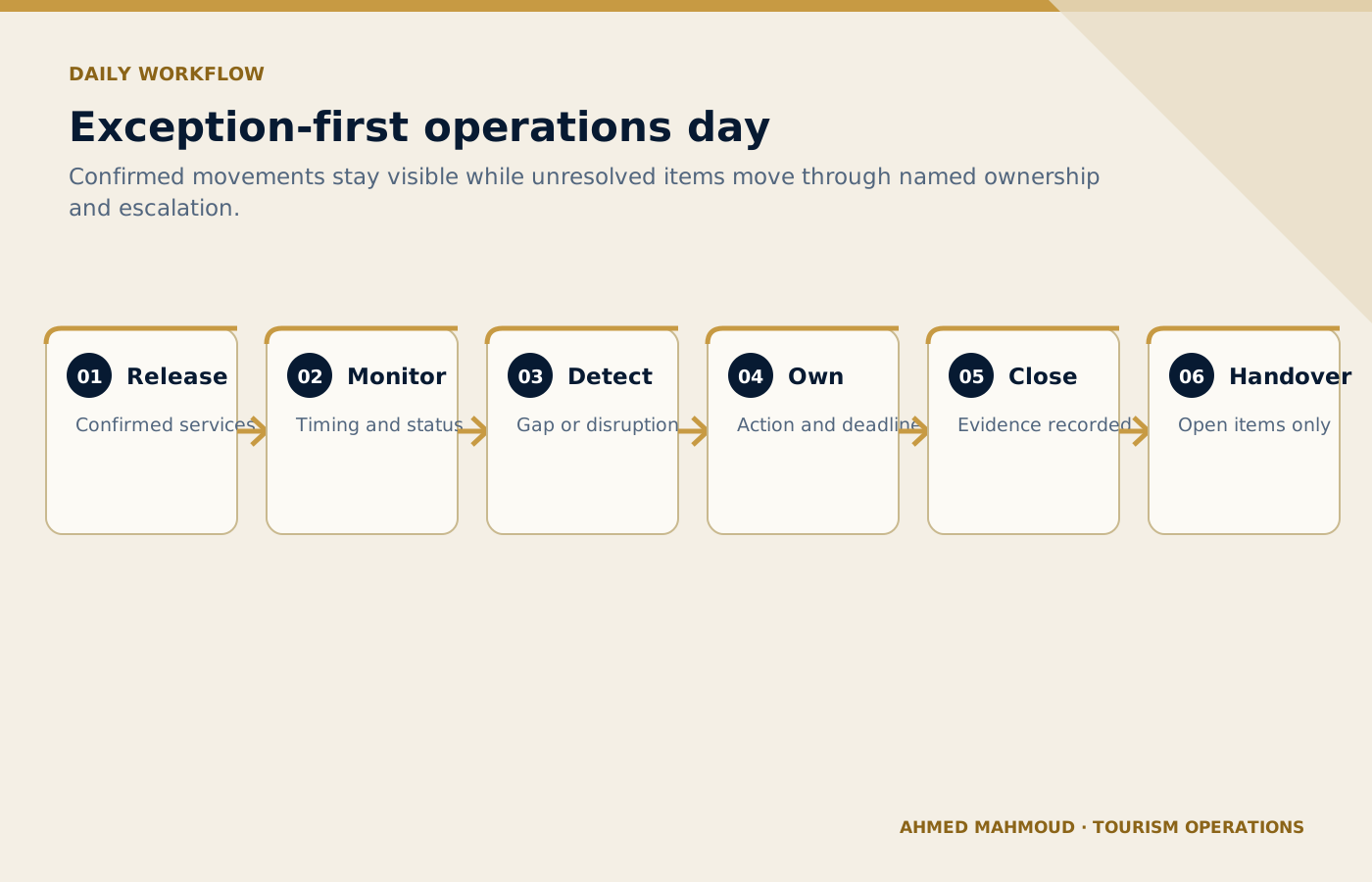
Unresolved items move through named ownership, deadlines and escalation instead of disappearing inside a polished briefing.
On small screens, scroll the diagram horizontally to read its labels.
#Common mistakes to avoid
- Mistake 1: Pasting an entire booking export with personal information.
- Mistake 2: Allowing AI to guess pickup times or vehicle availability.
- Mistake 3: Creating a polished briefing that hides unresolved items.
- Mistake 4: Ignoring language, licence, capacity or location constraints in assignments.
- Mistake 5: Closing an incident without recording ownership and next action.
A useful internal review question is: “Could a new employee read this output and mistake a proposal for a confirmation?” If the answer is yes, revise the prompt and output labels before use.
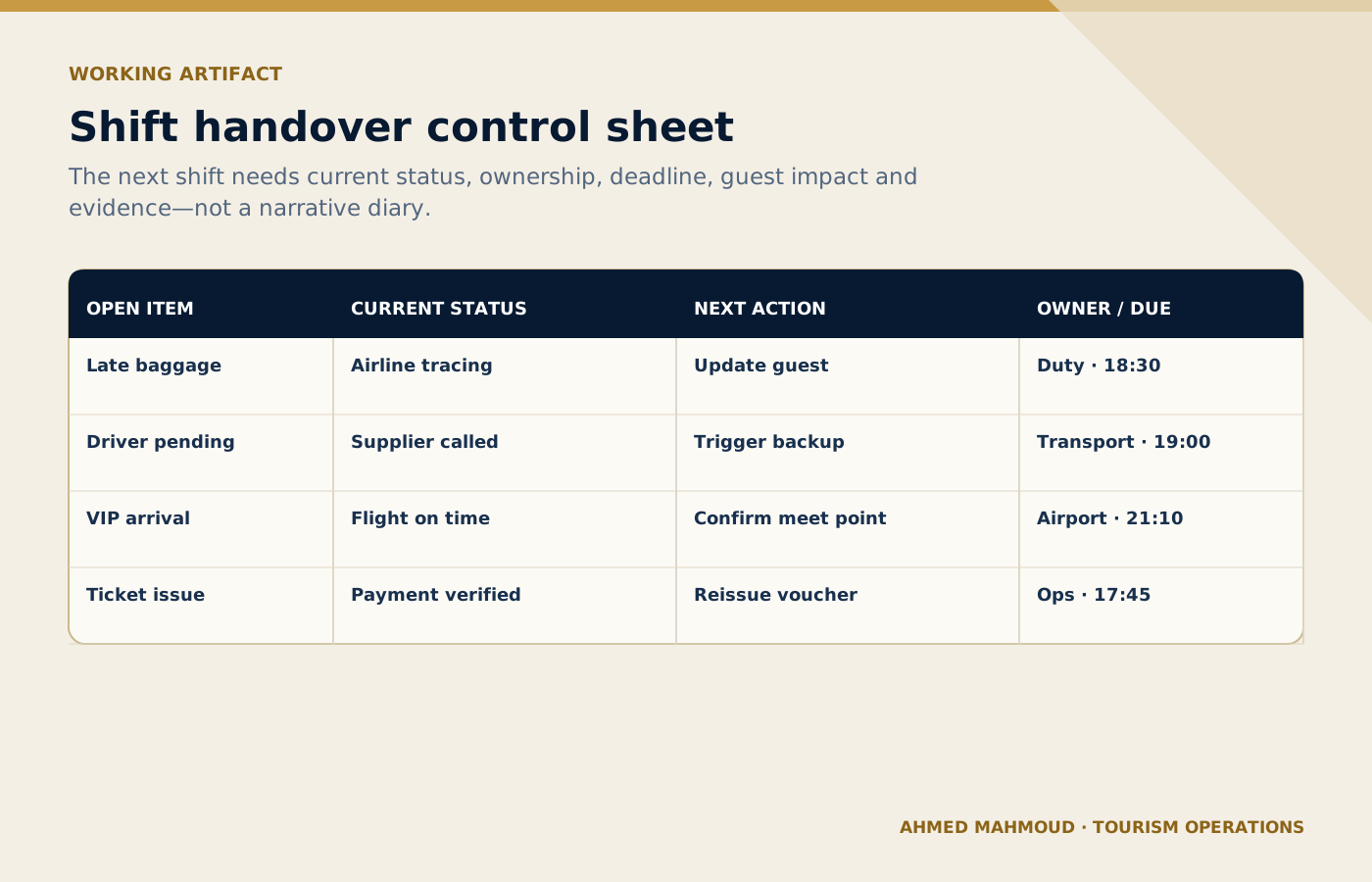
A structured handover gives the next shift the status, owner, deadline and action required for every open item.
On small screens, scroll the diagram horizontally to read its labels.
#Implementation guidance for tourism teams
Pilot the prompts on completed operations before using them on a live day. Compare the AI output with the actual operation log, identify what the prompt missed and add local rules. Once approved, connect each prompt to a clear operating stage and a named reviewer.
Choose a low-risk, frequent task with a clear owner and source of truth.
Run realistic anonymised cases, including missing data and operational exceptions.
Document the prompt version, permitted users, tool, reviewer and release criteria.
Track quality, time saved, defects, escalations and employee feedback.
Update the prompt when the process, destination, supplier or risk changes.
#Final verification checklist
#Use AI to strengthen tourism judgement, not to bypass it
The best result is not the longest response or the most impressive wording. It is an output that helps a trained tourism professional see the situation clearly, find missing information early, communicate consistently and make a controlled decision. Keep the TRAVEL framework, verification table, privacy boundaries and human sign-off visible every time the prompt is adapted.
#Questions tourism teams ask
Can AI dispatch tours automatically?
Not safely on prompt output alone. It can structure options and flag conflicts, while confirmed availability, licences, capacities and changes remain under operational control.
What data should a DMC remove?
Remove information that is not necessary for the task, including passport numbers, payment details, private contacts and sensitive guest notes.
How can AI help a shift handover?
It can convert structured notes into a priority-based handover that identifies owner, deadline, risk, current status and the next required action.
Should supplier confirmations be entered?
Only the minimum approved operational details and only in a company-approved tool. Confidential rates or contract terms should be excluded unless authorised.
What is the main human approval point?
The duty manager or authorised coordinator must approve any allocation, timing, supplier, service or recovery decision before action.
Professional verification reminder: Always compare AI output with approved internal systems, official sources and qualified human judgement before it affects a guest, supplier, employee or commercial commitment.
Connect this guide to your next step
Continue with related methods and the wider series.
- Related guideFront-Line Tourism AI Toolkit
Front-line teams can use AI to prepare, practise and communicate more consistently, while verified facts, empathy, safety and live decisions remain with the employee.
- Related guideThe Guest Experience AI Toolkit: 10 Prompts for Communication, Complaints, and Service Recovery
AI can support consistent guest communication and feedback analysis, while facts, privacy, empathy, recovery authority and accountability remain human responsibilities.
- Related guideThe Tourism Itinerary AI Toolkit: 10 Prompts for Realistic and Guest-Centred Travel Planning
AI can create an itinerary draft, but every hour, ticket, transfer, availability and access condition must be verified before sale or operation.
Put this article into practice
- Use the prompts to structure operating briefs, expose missing inputs and prepare handovers for human verification in approved systems.
- Verify the supplied facts and record any missing evidence before acting.
- Name the accountable owner and confirm the decision or approval limits.
- Test the result in the operating context and retain the verification record.
Your next step
Supply the required inputs, copy the complete prompt and verify the output before using it in the operation.
Apply Daily Operations Briefing