

- Who this helps
- Tourism quality managers, document owners and department supervisors.
- What you can do
- Give each document type a clear purpose and connect it to the work and evidence it supports.
#One incident, seven different information needs
A representative is waiting at an airport meeting point. The flight has arrived. Most passengers have exited, but one confirmed guest has not appeared. The driver is approaching the end of the approved waiting period. The hotel has no record of the guest checking in. The client is asking for an update.
What document does the employee need?
The answer is not automatically “the SOP.” The representative may need a work instruction to verify flight and baggage status. The dispatcher may need an escalation rule. The duty manager may need an authority matrix. The team may need a checklist to confirm that reasonable search steps were completed. A form may capture the facts. A message template may support careful client communication. The completed form, call log, and dispatch record become evidence of what happened.
If all this information is placed in one long SOP, the employee may struggle to find the action required at the moment of pressure. If the information is scattered without architecture, different teams may follow different rules. The solution is a connected document set in which each item has a distinct purpose.
ISO 10013:2021 provides guidance for developing and maintaining documented information tailored to an organization’s needs. It does not impose one universal document hierarchy. That flexibility is important: a small excursion company, a multi-market DMC, a hotel, and an event organizer will not need identical document volumes. They do, however, need to distinguish rules, methods, execution aids, data capture, and retained evidence.
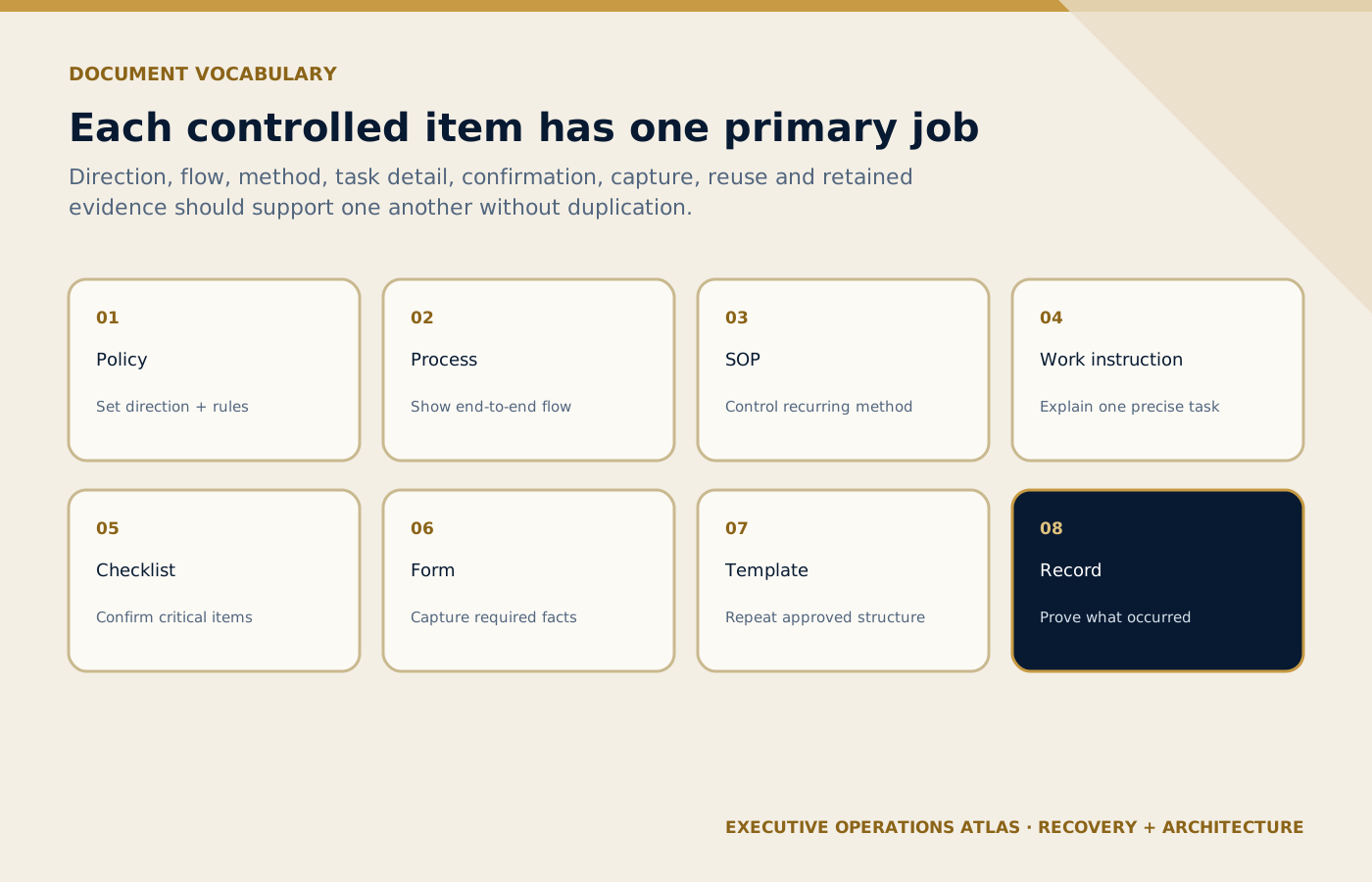
Each controlled item supports the wider system by performing one primary information or evidence function.
On small screens, scroll the diagram horizontally to read its labels.
#The vocabulary that prevents document confusion
#Policy: management’s direction and rules
A policy states the organization’s intentions, principles, and mandatory direction. It answers: What does management require, and why?
Example:
All confirmed airport transfers must be operated in accordance with approved service, guest-care, safety, accessibility, information-security, and escalation requirements applicable to the booking.
The policy should not contain every step for searching for a missing guest. Its role is to establish direction, scope, responsibility, and non-negotiable expectations. Policies usually require senior approval and change less frequently than task instructions.
A good policy is specific enough to guide decisions but stable enough to remain useful when a tool or sequence changes. “We value quality” is too vague. A fifteen-page operational procedure labeled “policy” is too detailed.
#Process: the end-to-end flow that produces a result
A process connects inputs, activities, roles, decisions, and outputs. It answers: How does work move from trigger to result?
For airport transfers:
Booking confirmation → operations handover → resource assignment → readiness check → flight monitoring → airport meeting → vehicle release → hotel transfer → service closure → reconciliation.
The process may cross Sales, Reservations, Operations, Transport, Guest Service, Finance, and suppliers. It is broader than one person’s task. A process map visualizes that flow; it is not automatically the procedure itself. Procedures, Processes and Process Maps: What Is the Difference? explains this boundary.
#SOP: the controlled method for operating a process
A Standard Operating Procedure defines how a recurring process is governed and performed. It answers: How do we control and execute this process consistently?
An airport-transfer SOP may cover:
- purpose and scope;
- definitions;
- roles and responsibilities;
- booking and readiness controls;
- flight monitoring;
- meeting and transfer steps;
- normal waiting rules;
- exceptions and escalation;
- records and retention;
- performance measures; and
- approval and revision history.
The SOP should be detailed enough to establish control but not overloaded with instructions that change every time the software interface changes. How to Write a Professional SOP: Part 1 — Structure provides the article template.
#Work instruction: the exact method for one task
A work instruction explains how a specific task is performed. It answers: Exactly how does the employee complete this activity?
Example: Verify flight arrival status.
- Access the company-approved flight-information source.
- Enter the airline and flight number from the current operating manifest.
- Confirm the date, origin, destination, and terminal.
- Compare scheduled, estimated, and actual arrival information.
- Record a material change in the designated operating system.
- Notify the dispatcher when the approved threshold or exception rule is reached.
The instruction may include screenshots or system fields if those details genuinely help the user. Because interfaces change, the instruction often needs a different review cycle from the parent SOP.
#Checklist: confirmation of critical actions or conditions
A checklist helps the user perform or confirm a limited set of important items. It answers: Have the critical steps or conditions been addressed?
An Airport No-Show Search Checklist might include:
- correct flight, date, and terminal verified;
- passenger name checked against current manifest;
- agreed meeting point and signage checked;
- baggage-delay or special-assistance information requested through approved channels;
- guest contact attempt made when permitted;
- hotel or client contact completed according to the escalation rule;
- waiting threshold monitored;
- dispatcher and duty manager status updated; and
- outcome and authorization recorded.
A checklist is not a substitute for training or judgement. It should contain critical items, use a logical sequence, and provide a route for exceptions. When every sentence from the SOP is copied into the checklist, the checklist stops being usable.
#Form: structured capture of required information
A form creates a consistent way to collect information. It answers: What facts and approvals must be captured?
A No-Show Incident Form might contain booking reference, service date, passenger name, flight, terminal, representative, vehicle, timeline, contact attempts, decision, authorization, guest/client communication, financial consequence, attachments, and closure status.
The form should collect only information that has a defined operational, contractual, legal, safety, analytical, or evidence purpose. Privacy minimization matters. A field should not be added merely because it may be interesting later.
An empty form is a controlled tool. A completed form becomes a record.
#Template: approved structure for recurring content
A template standardizes the format or wording of repeat communication. It answers: How should recurring information be presented?
Examples include:
- pickup-confirmation message;
- flight-delay update;
- missing-guest client update;
- incident-summary email;
- supplier confirmation;
- excursion cancellation notice; and
- shift-handover report.
Templates reduce avoidable variation, but they must not turn employees into robots. The user must insert accurate facts, remove irrelevant text, adapt tone to the guest and situation, and obtain approval where required. A message that sounds efficient internally may sound cold or accusatory to a worried guest.
#Record: evidence that an activity or result occurred
A record answers: What actually happened, when, and under whose responsibility?
Examples include a completed no-show form, signed checklist, dispatch timestamps, vehicle GPS data where lawful and authorized, client approval, call log, training assessment, or audit report.
Records should be factual, attributable, legible, protected, retrievable, and retained for an approved period. They should not be reconstructed after the event to make the process appear complete. If information is entered later, the system should preserve the actual entry time and reason where relevant.
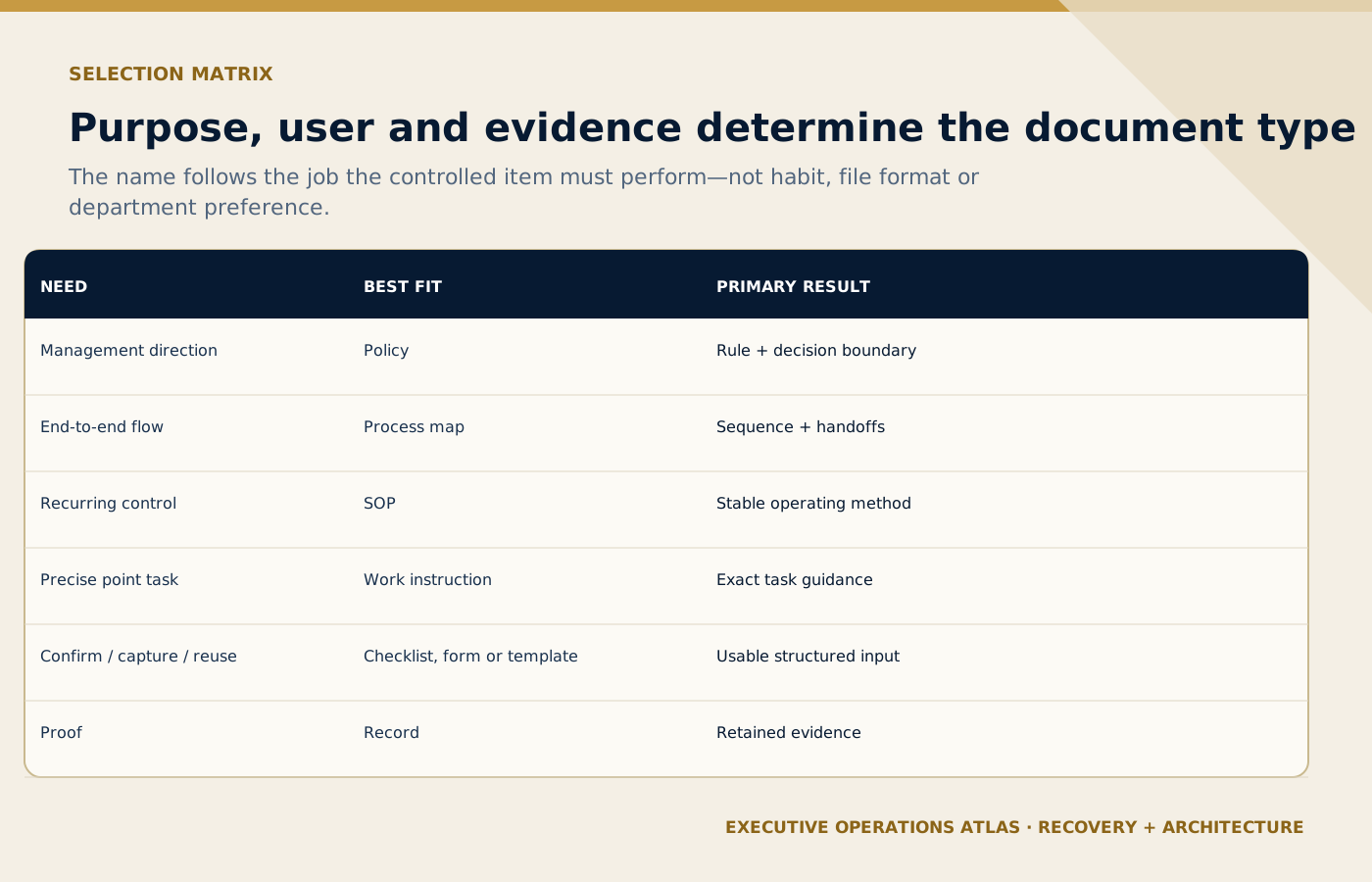
The work need, intended user and required evidence determine the document type—not habit or file format.
On small screens, scroll the diagram horizontally to read its labels.
#The comparison matrix
| Document type | Primary purpose | Typical owner | Normal level of detail | Becomes evidence? |
|---|---|---|---|---|
| Policy | Set direction and mandatory rules | Senior management / governance owner | Low to medium | The approved policy proves the rule existed, not that service occurred. |
| Process map | Show end-to-end flow and handoffs | Process owner | Visual overview | A controlled map proves the approved design. |
| SOP | Govern and describe a recurring process | Process owner | Medium | The approved SOP proves the defined method. |
| Work instruction | Explain one task precisely | Task owner / subject expert | High | The approved instruction proves the defined task method. |
| Checklist | Support or confirm critical steps | Operational owner | Concise | A completed checklist may become a record. |
| Form | Capture structured information | Process/data owner | Field-based | A completed form becomes a record. |
| Template | Standardize recurring content | Communication/process owner | Reusable structure | A completed and sent instance may become a record. |
| Record | Preserve evidence of activity or result | Record owner | Factual | It is the evidence. |
Scroll horizontally to read every column. Keyboard: focus the table, then use the arrow keys.
What to learn: Read each row across to connect Document type with Primary purpose, Typical owner, Normal level of detail, Becomes evidence?. Compare the rows to identify the relevant document type for your situation; use the accompanying section to interpret the result.
The exact labels may differ between organizations. What matters is that users understand the purpose, owner, approval, relationship, and status of each item.
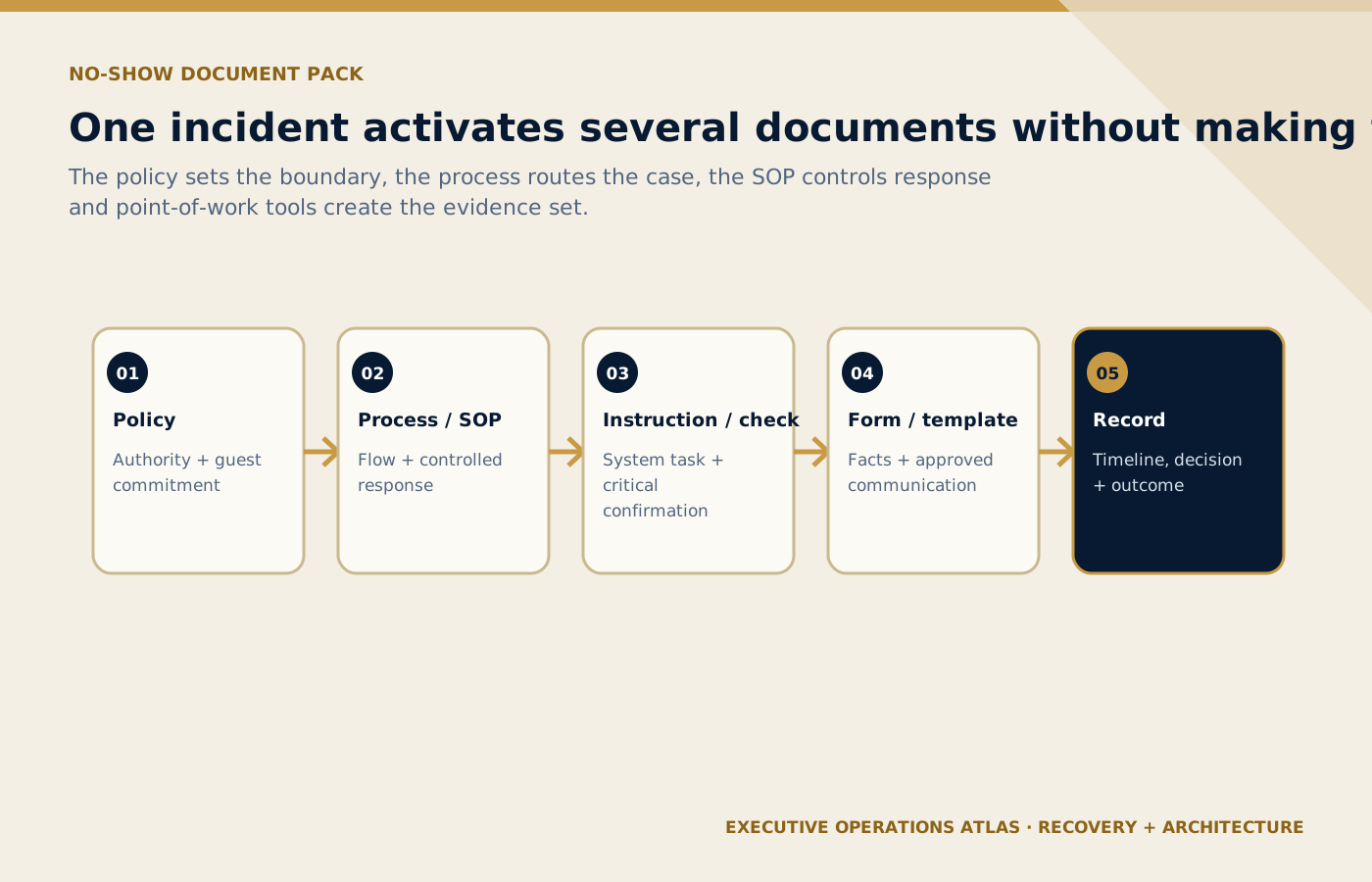
One incident activates several connected documents without asking one oversized SOP to perform every job.
On small screens, scroll the diagram horizontally to read its labels.
#Building the no-show document pack
The no-show scenario demonstrates how the documents connect without duplicating each other.
#The policy sets the expectation
The policy requires confirmed transfers to follow approved guest-care, safety, communication, and evidence standards. It also requires material exceptions to be escalated according to authority rules.
#The process map shows the path
The airport-transfer map shows where no-show management begins, which roles participate, how vehicle release interacts with guest search, and what outcomes return to operations and finance.
#The SOP defines the controlled response
The SOP identifies the normal meeting process, the trigger for a potential no-show, the search and communication stages, waiting-time rules, decision authority, records, and closure.
#Work instructions explain system tasks
Separate instructions may explain how to verify the flight, update the dispatch record, or record a contact attempt in the approved system. These instructions can change without rewriting the policy.
#The checklist protects critical steps
The checklist helps the representative and dispatcher avoid a premature no-show decision. It is short enough to use while the situation is live.
#The form captures the factual timeline
The form provides consistent fields for review, client communication, supplier reconciliation, complaint handling, and analysis.
#The template supports careful communication
The template gives the team an approved starting point:
We are currently unable to locate the guest at the confirmed meeting point. The airport representative has verified the flight and is completing the approved search and contact steps. We will provide the next update by [time].
This message states the known facts, avoids blame, and gives a next-update commitment. The employee must verify every detail before sending it.
#The completed items become the record set
The completed checklist, form, call log, authorization, message, and dispatch status provide a coherent account. They support learning only if the data is accurate and the records can be retrieved.
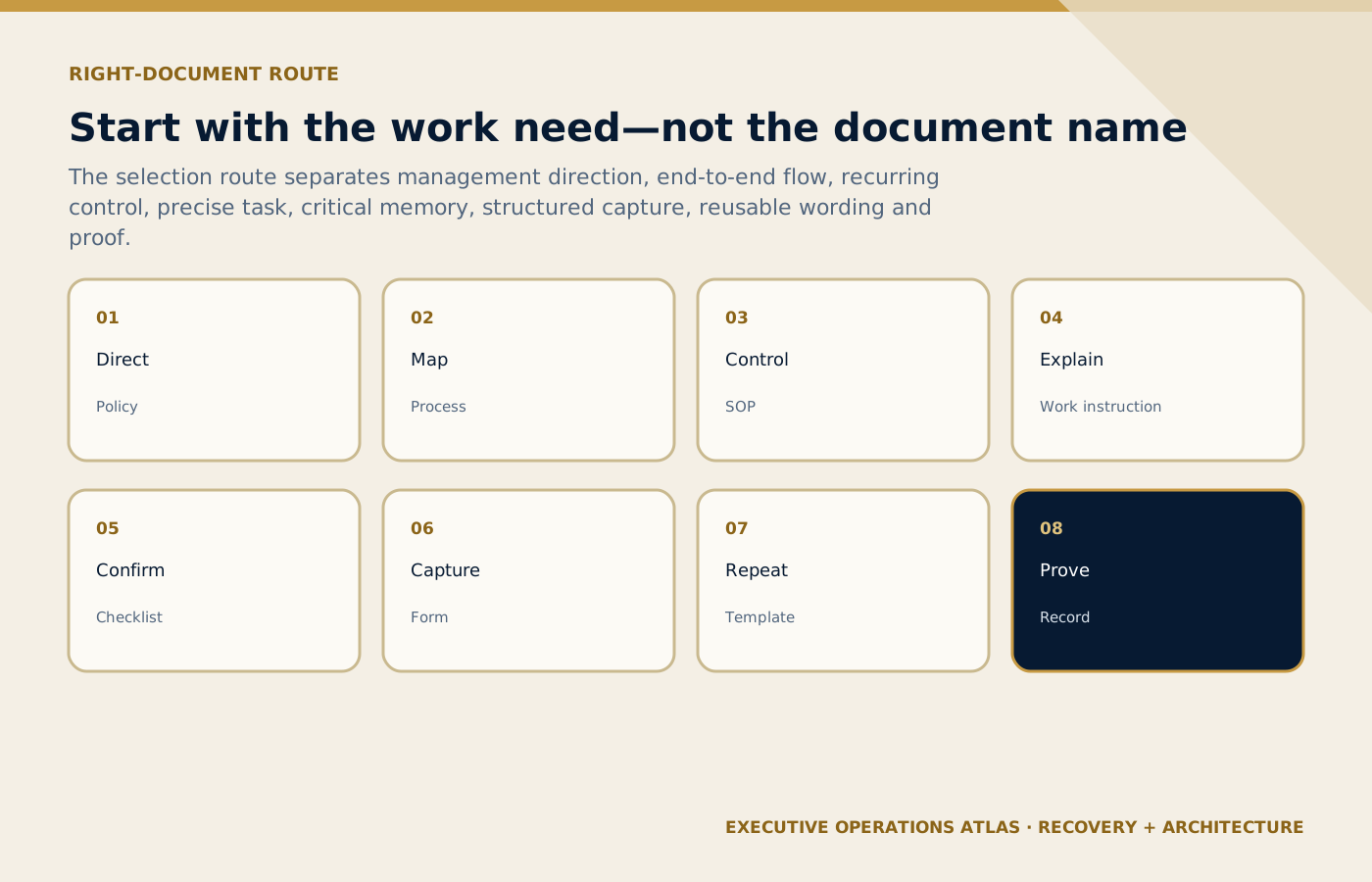
Starting with the operational need leads to the correct controlled item and prevents unnecessary duplication.
On small screens, scroll the diagram horizontally to read its labels.
#How to choose the right document
Use the following questions in order.
#Is the need about management direction?
Use a policy or standard when the organization needs a stable rule, principle, or minimum requirement across multiple processes.
#Is the need about end-to-end flow?
Use a process definition or map when the problem involves boundaries, inputs, outputs, handoffs, customers, or connected departments.
#Is the need about controlling a recurring process?
Use an SOP when employees need the approved operating method, responsibilities, main steps, exceptions, evidence, and measures.
#Is the need about one precise task?
Use a work instruction or job aid. Do not force the user to read the entire SOP to find four system steps.
#Is the need about remembering or confirming critical items?
Use a checklist. Keep it selective and link it to the governing procedure.
#Is the need about collecting the same information repeatedly?
Use a form with defined data ownership, validation, privacy, and retention rules.
#Is the need about repeating a communication or structure?
Use a template with clear customization and approval rules.
#Is the need about proving what occurred?
Define the record and the system in which it is retained. A blank template is not operational evidence.
#Design rules that keep the system coherent
#Reference; do not duplicate
If the approved waiting-time rule exists in the SOP, a checklist should reference or express the critical threshold consistently, not invent a second value. If the authority limit is controlled centrally, related procedures should point to it.
Duplication is sometimes unavoidable at the point of work, but it needs a source owner and synchronized change method.
#Match detail to user and risk
An experienced dispatcher may need a decision aid rather than a tutorial. A new airport representative may need a more detailed instruction and supervised practice. High-consequence tasks need clearer controls and competence evidence than low-risk administrative steps.
#Separate “maintain” from “retain”
The organization maintains current information needed to operate: policies, procedures, instructions, blank forms, and templates. It retains evidence of results: completed forms, logs, approvals, audit reports, and training records. The distinction affects access, editing rights, retention, privacy, and disposal.
#Give every controlled item metadata
At minimum, define title, identifier, owner, approver, version, effective date, status, and review date where appropriate. Document Control & Version Management develops the lifecycle.
#Design for the point of work
An airport representative may use a phone. A driver may need a short briefing. A hotel desk may need a printed fallback. A duty manager may need a dashboard. Format, access, and offline needs should be designed around the operating environment.
#Test with real scenarios
Ask employees to use the document set during a simulation. Can they find the current item? Do they understand the trigger? Can they record the outcome without inventing data? Does the escalation route work after hours? Observed use exposes problems that a document review will not.
#Common mistakes
#Calling every document an SOP
The library becomes impossible to navigate. Employees cannot tell which items are mandatory, instructional, or evidential.
#Writing policy as a slogan
“Guests come first” does not define responsibility or decision boundaries. A useful policy connects principle to management expectations.
#Turning the SOP into a software manual
Every interface change makes the whole procedure obsolete. Stable process control and volatile system instructions should be separated where practical.
#Creating checklists with no exception path
The user encounters “No” but does not know whether to stop, correct, escalate, or continue with authorization.
#Collecting data without purpose
Forms become long, privacy exposure increases, and employees complete fields poorly. Every field needs an owner and use.
#Sending templates without verification
An employee leaves a placeholder, uses an outdated time, or sends a message that does not fit the guest. Templates support judgement; they do not remove responsibility.
#Treating document approval as implementation
The document is released, but users are not trained, obsolete copies remain, and supervisors do not monitor use. The system exists on paper only.
#Practical tool: Tourism Document Selection Matrix
Before approving a new document, complete this short test.
| Selection question | Decision |
|---|---|
| What problem must this document solve? | State the operating need in one sentence. |
| Which user needs it, and at what point of work? | Name the role, environment, and device or format. |
| Is the content direction, flow, method, task detail, confirmation, data capture, communication, or evidence? | Select the primary document type. |
| Which approved document governs it? | Identify the parent policy, process, or SOP. |
| What information would be duplicated? | Remove duplication or define synchronization. |
| Who owns content and approval? | Name accountable roles, not departments alone. |
| What triggers revision? | Define change events and review frequency. |
| What does completion produce? | Define the record, storage location, access, and retention. |
| How will usability be tested? | Name a scenario, user group, and acceptance criteria. |
Scroll horizontally to read every column. Keyboard: focus the table, then use the arrow keys.
What to learn: Read each row across to connect Selection question with Decision. Compare the rows to identify the relevant selection question for your situation; use the accompanying section to interpret the result.
If the team cannot answer these questions, it is not ready to publish the document.
#Final perspective
A professional document system is not measured by the number of files it contains. It is measured by whether employees can identify the right rule, understand the flow, perform the task, confirm the critical points, capture the facts, communicate consistently, and retrieve evidence when needed.
Policies, processes, SOPs, work instructions, checklists, forms, templates, and records are not competing formats. They are different components of the operating system introduced in The Operating System Behind a Professional Tourism Company.
When each document has one clear job, the system becomes easier to use, easier to control, and much harder to misunderstand.
- The Operating System Behind a Professional Tourism Company
- Procedures, Processes and Process Maps: What Is the Difference?
- Building a Document Hierarchy for a Tourism Company
- Existing portfolio: Tourism Operations Roles
- Existing portfolio: The Tourism Quality and SOP AI Toolkit
#Sources and further reading
Primary standards, institutional guidance and professional references used to support this article.
- ISO 10013:2021, Quality management systems — Guidance for documented information
- ISO, The process approach in ISO 9001:2015
- ISO 9000 family — Quality management
- ISO 10007:2017, Quality management — Guidelines for configuration management
- ISO 22483:2020, Hotels — Service requirements
- ISO 21902:2021, Accessible tourism for all
Editorial note: Examples are recommended tourism adaptations, not mandatory ISO document structures. Organizations should apply relevant legal, regulatory, contractual, safety, accessibility, privacy, and record-retention requirements with qualified advice.
Connect this guide to your next step
Continue with related methods and the wider series.
- Related guideThe Operating System Behind a Professional Tourism Company
A tourism company does not become reliable because it owns a folder called “SOPs.” It becomes reliable when policies, processes, people, tools, records, measures, and improvement routines work as one operating system.
- Related guideHow to Write Work Instructions
Translate one technical or task-level activity into precise, user-tested steps with prerequisites, acceptance criteria, warnings, evidence, and a controlled route back to the SOP.
- Related guideSOP Writing Part 5: Evidence, Documentation and Legal Defensibility
Design records that capture timely, factual, proportionate evidence of what happened—without turning operational documentation into improvised legal conclusions.
Put this article into practice
- Give each document type a clear purpose and connect it to the work and evidence it supports.
- Verify the supplied facts and record any missing evidence before acting.
- Name the accountable owner and confirm the decision or approval limits.
- Test the result in the operating context and retain the verification record.
Your next step
Use this connected method when you are ready to design a hierarchy that connects policy, SOPs, instructions, checklists and records around real operating tasks.
Review Building a Document Hierarchy for a Tourism Company