

- Who this helps
- Tourism quality managers, process owners, auditors and improvement teams.
- What you can do
- Use the prompts to structure process mapping, SOP drafts and quality analysis while keeping evidence and validation with the process owner.
#Target audience
Tourism quality managers, operations leaders, DMC supervisors, trainers, process owners, internal auditors and Lean Six Sigma practitioners.
This is a working guide for people who already understand that tourism is delivered through connected handovers. The prompts are designed to improve preparation, consistency and visibility; they do not transfer authority from the trained employee to the AI system.
#Why this topic matters in tourism
Tourism quality is measured in live service: the guest was found, the vehicle arrived, the attraction process worked, the guide was prepared and recovery was controlled. AI can help structure quality work, but it cannot establish evidence, determine accountability or approve a corrective action by itself.
The toolkit adapts process-improvement methods to tourism handovers, suppliers, movements and guest-facing service. Each prompt requires evidence, process ownership and practical field validation so the result does not sound like a generic manufacturing document.
AI may organise information and propose a structure. It must not manufacture the confirmed operational reality. When the source of truth changes, the employee must update the inputs and verify the output again.
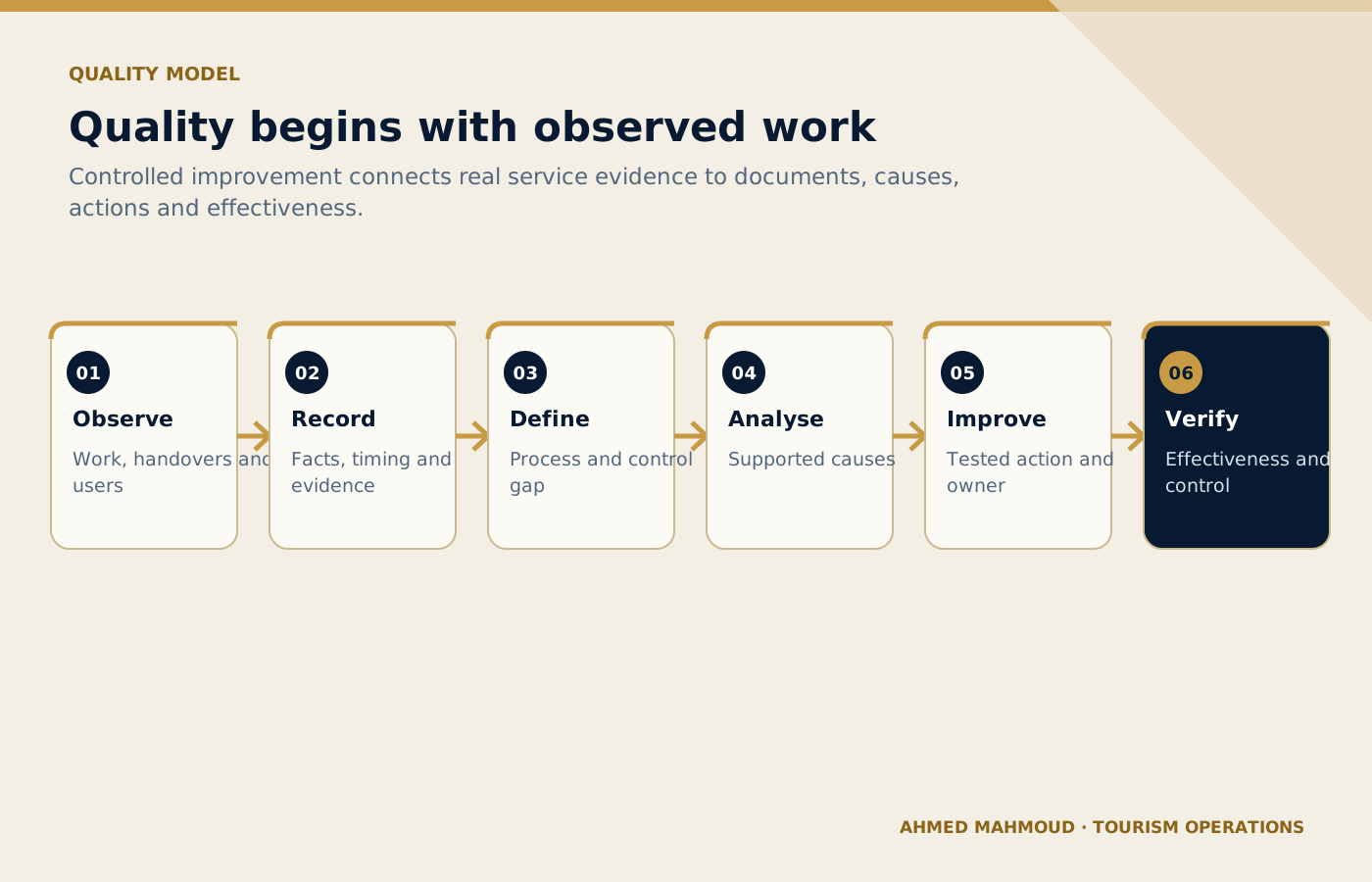
A controlled SOP and improvement decision starts with observed service evidence rather than management assumptions.
On small screens, scroll the diagram horizontally to read its labels.
#Responsible AI rules for this toolkit
- Base analysis on records, observations and confirmed statements.
- Separate immediate correction, root cause, corrective action and preventive action.
- Do not name or blame employees without verified evidence and due process.
- Test SOP steps with the people who perform the work.
- Require process-owner approval and a review date.
Companies should adapt these rules to approved tools, information-security controls, local law, supplier contracts and internal authority. When the implications are legal, privacy-related or cybersecurity-related, qualified specialists should be consulted.
#The TRAVEL prompting framework
Every template in this playbook follows one memorable structure. The aim is not to make prompts longer for their own sake. It is to place the information, controls and approval points that a tourism professional needs in the right order.
state the professional perspective and the business decision to support.
include the destination, service type, timing, guest journey stage and confirmed constraints.
define the guest or client profile and provide only verified, permitted information.
require source labels, assumptions, uncertainty flags and a check against official or approved records.
specify the exact structure, priority order, tone, length and escalation path.
prohibit invention, protect data and identify who approves the final output.
In one sentence: a professional tourism prompt identifies the task, supplies the real operating context, defines the audience and approved inputs, demands a verifiable structure, explains exceptions and keeps privacy plus final authority with a human.
#Ten professional prompt templates
Each prompt contains editable placeholders and a built-in stop rule for missing information. Copy it, replace the placeholders with approved facts and keep the verification and human-approval sections intact. The templates are intentionally detailed because the omitted detail is often where a tourism failure begins.
#SOP Creation
Create a field-ready sop from a verified current process and control requirements.
#When to use it
Use it for a controlled draft before information reaches a guest, supplier, colleague or manager.
#Required inputs
- process purpose
- trigger
- scope
- roles
- observed steps
- systems
- forms
- timing
- exceptions
- safety
- approvals
- records
Illustrative scenarioWorked example: SOP Creation
Operational teaching scenario, not a documented incident. Uncited figures and outcomes are illustrative assumptions.
- Situation
Example: A DMC documents its airport representative arrival process.
- Evidence
Check the supplied process purpose, trigger, scope, roles, observed steps. Treat scenario inputs as assumptions until confirmed against approved records.
- Decision
Decide whether the inputs are complete and the task is authorised. If not, request the missing information before using the prompt.
- Action
Prepare the sop creation draft from the checked inputs; keep unresolved facts and required approvals visible.
- Verification
Compare the draft with the source records and expected outputs. The named accountable owner must verify and approve it before live use.
#Complete prompt
ROLE
Act as a tourism process owner and SOP facilitator in a professional tourism organisation.

TASK
Create a field-ready sop from a verified current process and control requirements.

CONTEXT
Destination/service: [Insert confirmed details]
Date, operating stage and guest/client profile: [Insert approved information]
Sources of truth: [List approved systems, confirmations, SOPs or official sources]

INPUTS
Provide: process purpose; trigger; scope; roles; observed steps; systems; forms; timing; exceptions; safety; approvals; records.
If an essential input is missing, contradictory or unconfirmed, stop and list what is required, its owner and source. Do not guess.

OUTPUT
Return: document control; purpose; roles; step table; decision points; exceptions; records; KPIs; training; review. Separate confirmed facts, assumptions, recommendations and pending items. Label dynamic facts with their source and verification date when supplied.

LIMITS
Do not invent steps. Mark every area requiring observation or process-owner validation.

PRIVACY AND APPROVAL
Exclude unnecessary personal data, identity or payment details, confidential rates, contracts and security information. Finish with verification actions, unresolved questions and the final approver’s role. The output remains a draft until that person checks it against approved sources.
#Expected output
- document control
- purpose
- roles
- step table
- decision points
- exceptions
- records
- KPIs
- training
- review
Human verification
Professional tourism trainer’s noteReplace every placeholder and keep unresolved items visible until an authorised professional reviews them.
#SOP Review and Improvement
Audit an existing sop against actual practice, risk and usability.
#When to use it
Use it for a controlled draft before information reaches a guest, supplier, colleague or manager.
#Required inputs
- current SOP
- observation notes
- employee feedback
- incidents
- system changes
- policy
- metrics
- version history
Illustrative scenarioWorked example: SOP Review and Improvement
Operational teaching scenario, not a documented incident. Uncited figures and outcomes are illustrative assumptions.
- Situation
Example: A pickup SOP no longer matches the dispatch application used by the team.
- Evidence
Check the supplied current SOP, observation notes, employee feedback, incidents, system changes. Treat scenario inputs as assumptions until confirmed against approved records.
- Decision
Decide whether the inputs are complete and the task is authorised. If not, request the missing information before using the prompt.
- Action
Prepare the sop review and improvement draft from the checked inputs; keep unresolved facts and required approvals visible.
- Verification
Compare the draft with the source records and expected outputs. The named accountable owner must verify and approve it before live use.
#Complete prompt
ROLE
Act as a tourism quality manager in a professional tourism organisation.

TASK
Audit an existing sop against actual practice, risk and usability.

CONTEXT
Destination/service: [Insert confirmed details]
Date, operating stage and guest/client profile: [Insert approved information]
Sources of truth: [List approved systems, confirmations, SOPs or official sources]

INPUTS
Provide: current SOP; observation notes; employee feedback; incidents; system changes; policy; metrics; version history.
If an essential input is missing, contradictory or unconfirmed, stop and list what is required, its owner and source. Do not guess.

OUTPUT
Return: gap matrix; obsolete steps; hidden work; control failures; revised sections; validation plan. Separate confirmed facts, assumptions, recommendations and pending items. Label dynamic facts with their source and verification date when supplied.

LIMITS
Do not change controlled requirements without authorised review.

PRIVACY AND APPROVAL
Exclude unnecessary personal data, identity or payment details, confidential rates, contracts and security information. Finish with verification actions, unresolved questions and the final approver’s role. The output remains a draft until that person checks it against approved sources.
#Expected output
- gap matrix
- obsolete steps
- hidden work
- control failures
- revised sections
- validation plan
Human verification
Professional tourism trainer’s noteReplace every placeholder and keep unresolved items visible until an authorised professional reviews them.
#Tourism Process Mapping
Map a guest-facing process across roles, handovers and systems.
#When to use it
Use it for a controlled draft before information reaches a guest, supplier, colleague or manager.
#Required inputs
- start/end
- customer
- suppliers
- inputs
- observed steps
- decisions
- queues
- systems
- defects
- timing
- owners
Illustrative scenarioWorked example: Tourism Process Mapping
Operational teaching scenario, not a documented incident. Uncited figures and outcomes are illustrative assumptions.
- Situation
Example: The team maps booking handover from sales to operations to the guide.
- Evidence
Check the supplied start/end, customer, suppliers, inputs, observed steps. Treat scenario inputs as assumptions until confirmed against approved records.
- Decision
Decide whether the inputs are complete and the task is authorised. If not, request the missing information before using the prompt.
- Action
Prepare the tourism process mapping draft from the checked inputs; keep unresolved facts and required approvals visible.
- Verification
Compare the draft with the source records and expected outputs. The named accountable owner must verify and approve it before live use.
#Complete prompt
ROLE
Act as a Lean Six Sigma tourism facilitator in a professional tourism organisation.

TASK
Map a guest-facing process across roles, handovers and systems.

CONTEXT
Destination/service: [Insert confirmed details]
Date, operating stage and guest/client profile: [Insert approved information]
Sources of truth: [List approved systems, confirmations, SOPs or official sources]

INPUTS
Provide: start/end; customer; suppliers; inputs; observed steps; decisions; queues; systems; defects; timing; owners.
If an essential input is missing, contradictory or unconfirmed, stop and list what is required, its owner and source. Do not guess.

OUTPUT
Return: SIPOC; swimlane narrative; value/non-value analysis; failure points; data needs; future-state questions. Separate confirmed facts, assumptions, recommendations and pending items. Label dynamic facts with their source and verification date when supplied.

LIMITS
Represent the current state honestly before proposing improvements.

PRIVACY AND APPROVAL
Exclude unnecessary personal data, identity or payment details, confidential rates, contracts and security information. Finish with verification actions, unresolved questions and the final approver’s role. The output remains a draft until that person checks it against approved sources.
#Expected output
- SIPOC
- swimlane narrative
- value/non-value analysis
- failure points
- data needs
- future-state questions
Human verification
Professional tourism trainer’s noteReplace every placeholder and keep unresolved items visible until an authorised professional reviews them.
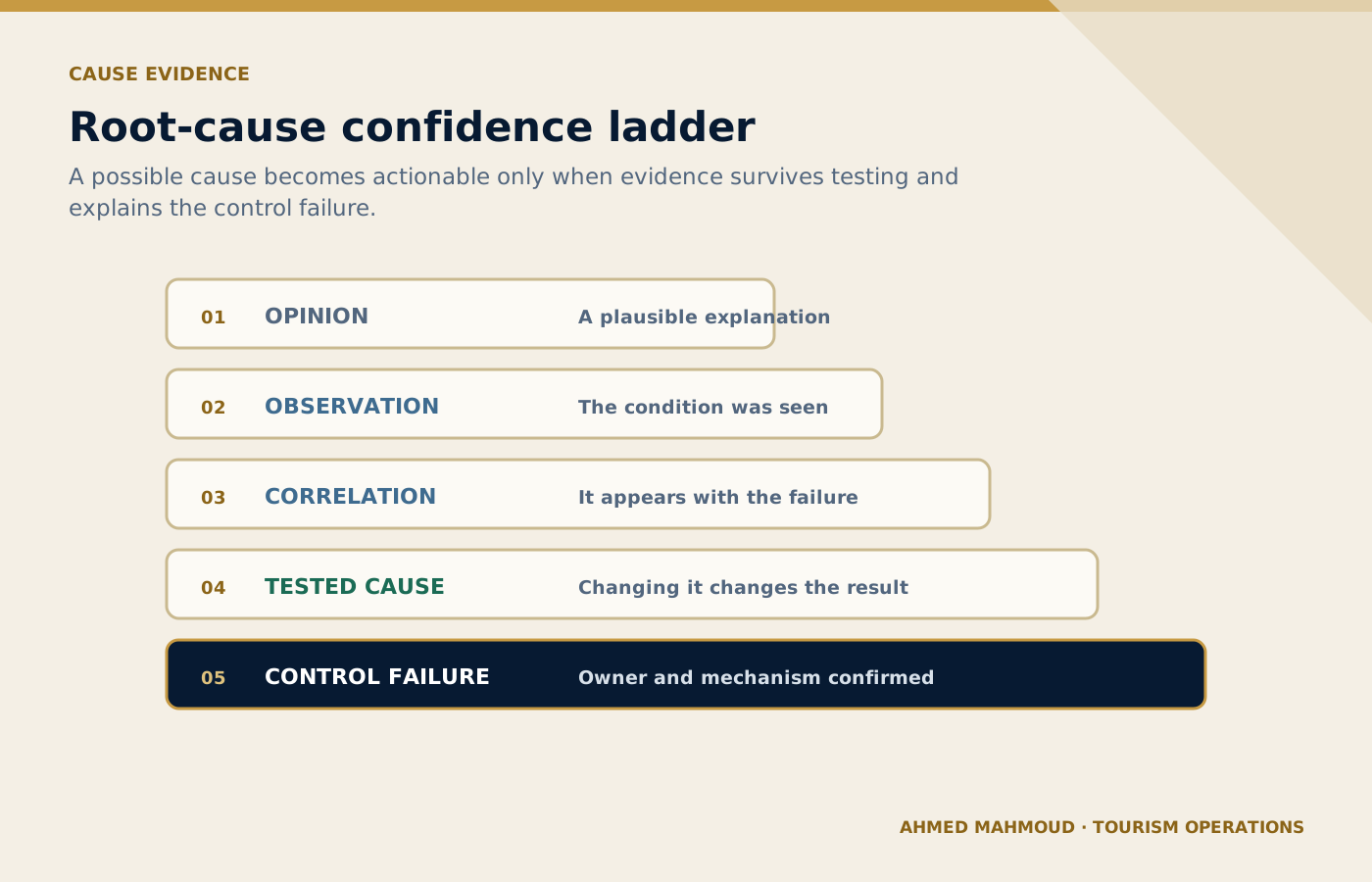
A plausible explanation becomes actionable only when evidence supports the mechanism and the failed control.
On small screens, scroll the diagram horizontally to read its labels.
#Five Whys Analysis
Lead an evidence-based five whys analysis that goes beyond blame.
#When to use it
Use it for a controlled draft before information reaches a guest, supplier, colleague or manager.
#Required inputs
- problem statement
- when/where
- scale
- timeline
- records
- interviews
- controls
- prior incidents
Illustrative scenarioWorked example: Five Whys Analysis
Operational teaching scenario, not a documented incident. Uncited figures and outcomes are illustrative assumptions.
- Situation
Example: Guests repeatedly receive the pickup message too late.
- Evidence
Check the supplied problem statement, when/where, scale, timeline, records. Treat scenario inputs as assumptions until confirmed against approved records.
- Decision
Decide whether the inputs are complete and the task is authorised. If not, request the missing information before using the prompt.
- Action
Prepare the five whys analysis draft from the checked inputs; keep unresolved facts and required approvals visible.
- Verification
Compare the draft with the source records and expected outputs. The named accountable owner must verify and approve it before live use.
#Complete prompt
ROLE
Act as a tourism root-cause facilitator in a professional tourism organisation.

TASK
Lead an evidence-based five whys analysis that goes beyond blame.

CONTEXT
Destination/service: [Insert confirmed details]
Date, operating stage and guest/client profile: [Insert approved information]
Sources of truth: [List approved systems, confirmations, SOPs or official sources]

INPUTS
Provide: problem statement; when/where; scale; timeline; records; interviews; controls; prior incidents.
If an essential input is missing, contradictory or unconfirmed, stop and list what is required, its owner and source. Do not guess.

OUTPUT
Return: validated problem; why chain with evidence; branches; root-cause confidence; missing evidence; actions. Separate confirmed facts, assumptions, recommendations and pending items. Label dynamic facts with their source and verification date when supplied.

LIMITS
Do not force exactly five levels or stop at “staff forgot”.

PRIVACY AND APPROVAL
Exclude unnecessary personal data, identity or payment details, confidential rates, contracts and security information. Finish with verification actions, unresolved questions and the final approver’s role. The output remains a draft until that person checks it against approved sources.
#Expected output
- validated problem
- why chain with evidence
- branches
- root-cause confidence
- missing evidence
- actions
Human verification
Professional tourism trainer’s noteReplace every placeholder and keep unresolved items visible until an authorised professional reviews them.
#Fishbone Analysis
Organise possible causes across service-relevant categories and create a validation plan.
#When to use it
Use it for a controlled draft before information reaches a guest, supplier, colleague or manager.
#Required inputs
- problem
- evidence
- people
- process
- systems
- supplier
- environment
- information
- measurement
- management
Illustrative scenarioWorked example: Fishbone Analysis
Operational teaching scenario, not a documented incident. Uncited figures and outcomes are illustrative assumptions.
- Situation
Example: Coaches repeatedly arrive late at one attraction.
- Evidence
Check the supplied problem, evidence, people, process, systems. Treat scenario inputs as assumptions until confirmed against approved records.
- Decision
Decide whether the inputs are complete and the task is authorised. If not, request the missing information before using the prompt.
- Action
Prepare the fishbone analysis draft from the checked inputs; keep unresolved facts and required approvals visible.
- Verification
Compare the draft with the source records and expected outputs. The named accountable owner must verify and approve it before live use.
#Complete prompt
ROLE
Act as a tourism quality workshop facilitator in a professional tourism organisation.

TASK
Organise possible causes across service-relevant categories and create a validation plan.

CONTEXT
Destination/service: [Insert confirmed details]
Date, operating stage and guest/client profile: [Insert approved information]
Sources of truth: [List approved systems, confirmations, SOPs or official sources]

INPUTS
Provide: problem; evidence; people; process; systems; supplier; environment; information; measurement; management.
If an essential input is missing, contradictory or unconfirmed, stop and list what is required, its owner and source. Do not guess.

OUTPUT
Return: fishbone categories; possible causes; evidence status; test method; priority hypotheses; workshop questions. Separate confirmed facts, assumptions, recommendations and pending items. Label dynamic facts with their source and verification date when supplied.

LIMITS
Possible causes are not confirmed root causes.

PRIVACY AND APPROVAL
Exclude unnecessary personal data, identity or payment details, confidential rates, contracts and security information. Finish with verification actions, unresolved questions and the final approver’s role. The output remains a draft until that person checks it against approved sources.
#Expected output
- fishbone categories
- possible causes
- evidence status
- test method
- priority hypotheses
- workshop questions
Human verification
Professional tourism trainer’s noteReplace every placeholder and keep unresolved items visible until an authorised professional reviews them.
#Incident-Report Preparation
Turn factual notes into a neutral, chronological incident report.
#When to use it
Use it for a controlled draft before information reaches a guest, supplier, colleague or manager.
#Required inputs
- date/time
- location
- people by role or anonymised ID
- observed facts
- actions
- guest impact
- evidence
- notifications
- open items
Illustrative scenarioWorked example: Incident-Report Preparation
Operational teaching scenario, not a documented incident. Uncited figures and outcomes are illustrative assumptions.
- Situation
Example: A guest is temporarily separated from a group at a busy attraction.
- Evidence
Check the supplied date/time, location, people by role or anonymised ID, observed facts, actions. Treat scenario inputs as assumptions until confirmed against approved records.
- Decision
Decide whether the inputs are complete and the task is authorised. If not, request the missing information before using the prompt.
- Action
Prepare the incident-report preparation draft from the checked inputs; keep unresolved facts and required approvals visible.
- Verification
Compare the draft with the source records and expected outputs. The named accountable owner must verify and approve it before live use.
#Complete prompt
ROLE
Act as a tourism incident documentation specialist in a professional tourism organisation.

TASK
Turn factual notes into a neutral, chronological incident report.

CONTEXT
Destination/service: [Insert confirmed details]
Date, operating stage and guest/client profile: [Insert approved information]
Sources of truth: [List approved systems, confirmations, SOPs or official sources]

INPUTS
Provide: date/time; location; people by role or anonymised ID; observed facts; actions; guest impact; evidence; notifications; open items.
If an essential input is missing, contradictory or unconfirmed, stop and list what is required, its owner and source. Do not guess.

OUTPUT
Return: summary; chronology; immediate controls; statements separated; evidence list; escalation; follow-up. Separate confirmed facts, assumptions, recommendations and pending items. Label dynamic facts with their source and verification date when supplied.

LIMITS
Do not speculate, assign blame or remove inconvenient facts.

PRIVACY AND APPROVAL
Exclude unnecessary personal data, identity or payment details, confidential rates, contracts and security information. Finish with verification actions, unresolved questions and the final approver’s role. The output remains a draft until that person checks it against approved sources.
#Expected output
- summary
- chronology
- immediate controls
- statements separated
- evidence list
- escalation
- follow-up
Human verification
Professional tourism trainer’s noteReplace every placeholder and keep unresolved items visible until an authorised professional reviews them.
#Corrective and Preventive Action Planning
Create a controlled capa plan after a supported root-cause finding.
#When to use it
Use it for a controlled draft before information reaches a guest, supplier, colleague or manager.
#Required inputs
- incident
- root cause
- affected processes
- immediate correction
- risk
- proposed actions
- owners
- resources
- measures
- due dates
Illustrative scenarioWorked example: Corrective and Preventive Action Planning
Operational teaching scenario, not a documented incident. Uncited figures and outcomes are illustrative assumptions.
- Situation
Example: An attraction voucher error recurs across two products.
- Evidence
Check the supplied incident, root cause, affected processes, immediate correction, risk. Treat scenario inputs as assumptions until confirmed against approved records.
- Decision
Decide whether the inputs are complete and the task is authorised. If not, request the missing information before using the prompt.
- Action
Prepare the corrective and preventive action planning draft from the checked inputs; keep unresolved facts and required approvals visible.
- Verification
Compare the draft with the source records and expected outputs. The named accountable owner must verify and approve it before live use.
#Complete prompt
ROLE
Act as a tourism CAPA coordinator in a professional tourism organisation.

TASK
Create a controlled capa plan after a supported root-cause finding.

CONTEXT
Destination/service: [Insert confirmed details]
Date, operating stage and guest/client profile: [Insert approved information]
Sources of truth: [List approved systems, confirmations, SOPs or official sources]

INPUTS
Provide: incident; root cause; affected processes; immediate correction; risk; proposed actions; owners; resources; measures; due dates.
If an essential input is missing, contradictory or unconfirmed, stop and list what is required, its owner and source. Do not guess.

OUTPUT
Return: correction; corrective actions; preventive actions; owner; milestone; verification; effectiveness check; closure rule. Separate confirmed facts, assumptions, recommendations and pending items. Label dynamic facts with their source and verification date when supplied.

LIMITS
Do not close an action because training was delivered; require effectiveness evidence.

PRIVACY AND APPROVAL
Exclude unnecessary personal data, identity or payment details, confidential rates, contracts and security information. Finish with verification actions, unresolved questions and the final approver’s role. The output remains a draft until that person checks it against approved sources.
#Expected output
- correction
- corrective actions
- preventive actions
- owner
- milestone
- verification
- effectiveness check
- closure rule
Human verification
Professional tourism trainer’s noteReplace every placeholder and keep unresolved items visible until an authorised professional reviews them.
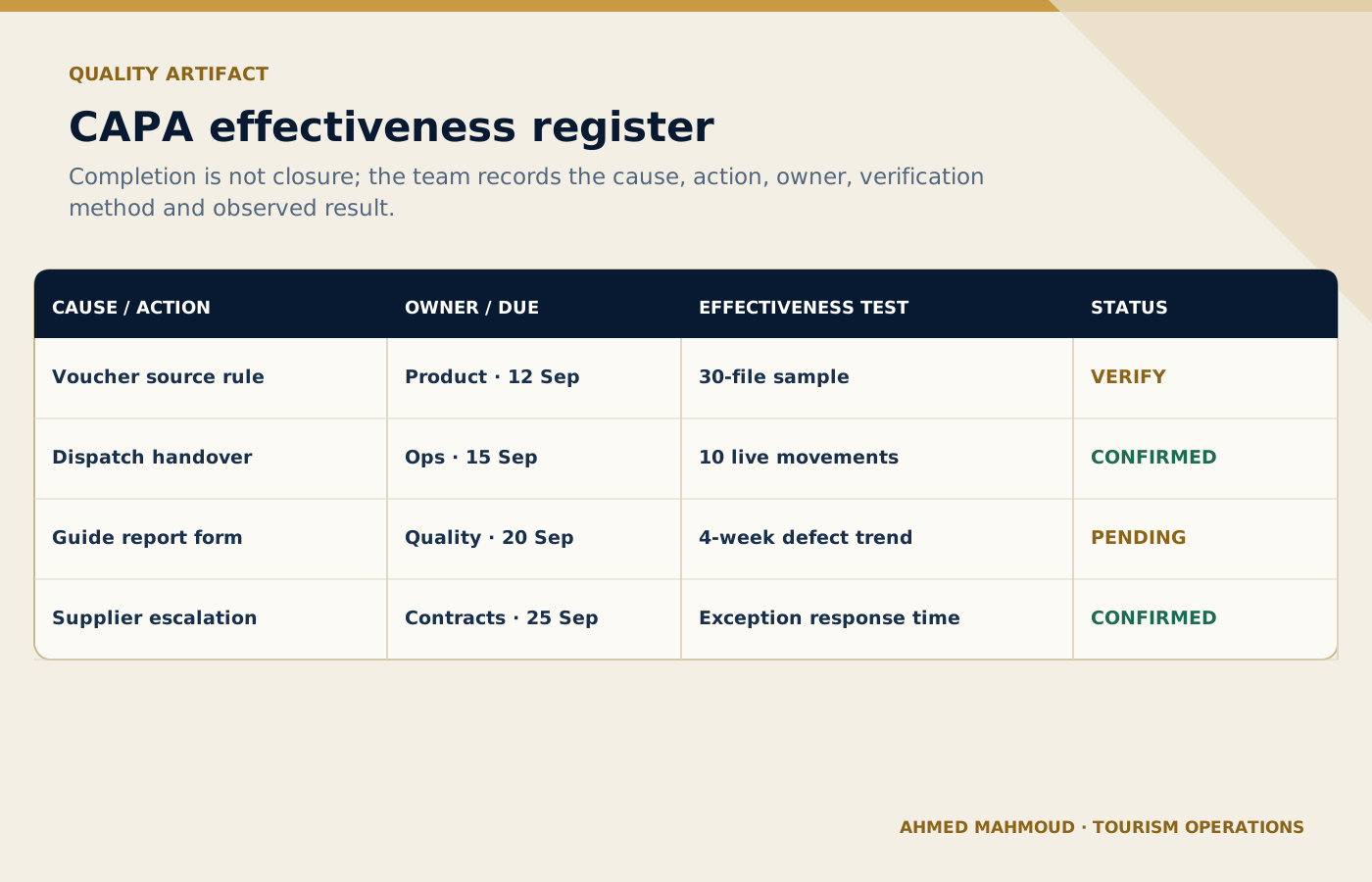
Completion is separated from effectiveness so actions remain open until the defined evidence supports closure.
On small screens, scroll the diagram horizontally to read its labels.
#Operational Audit Checklist
Design a risk-based audit checklist that tests evidence rather than only asking yes/no questions.
#When to use it
Use it for a controlled draft before information reaches a guest, supplier, colleague or manager.
#Required inputs
- process
- SOP
- critical controls
- records
- sampling period
- roles
- known risks
- regulatory or company criteria
Illustrative scenarioWorked example: Operational Audit Checklist
Operational teaching scenario, not a documented incident. Uncited figures and outcomes are illustrative assumptions.
- Situation
Example: Quality audits the morning dispatch process during peak season.
- Evidence
Check the supplied process, SOP, critical controls, records, sampling period. Treat scenario inputs as assumptions until confirmed against approved records.
- Decision
Decide whether the inputs are complete and the task is authorised. If not, request the missing information before using the prompt.
- Action
Prepare the operational audit checklist draft from the checked inputs; keep unresolved facts and required approvals visible.
- Verification
Compare the draft with the source records and expected outputs. The named accountable owner must verify and approve it before live use.
#Complete prompt
ROLE
Act as a tourism internal auditor in a professional tourism organisation.

TASK
Design a risk-based audit checklist that tests evidence rather than only asking yes/no questions.

CONTEXT
Destination/service: [Insert confirmed details]
Date, operating stage and guest/client profile: [Insert approved information]
Sources of truth: [List approved systems, confirmations, SOPs or official sources]

INPUTS
Provide: process; SOP; critical controls; records; sampling period; roles; known risks; regulatory or company criteria.
If an essential input is missing, contradictory or unconfirmed, stop and list what is required, its owner and source. Do not guess.

OUTPUT
Return: audit objective; sample; questions; evidence expected; scoring; critical failures; interview prompts; report format. Separate confirmed facts, assumptions, recommendations and pending items. Label dynamic facts with their source and verification date when supplied.

LIMITS
Do not include a criterion unless its source and owner are known.

PRIVACY AND APPROVAL
Exclude unnecessary personal data, identity or payment details, confidential rates, contracts and security information. Finish with verification actions, unresolved questions and the final approver’s role. The output remains a draft until that person checks it against approved sources.
#Expected output
- audit objective
- sample
- questions
- evidence expected
- scoring
- critical failures
- interview prompts
- report format
Human verification
Professional tourism trainer’s noteReplace every placeholder and keep unresolved items visible until an authorised professional reviews them.
#Training-Needs Analysis
Identify whether a performance gap requires training, process change, tools or management action.
#When to use it
Use it for a controlled draft before information reaches a guest, supplier, colleague or manager.
#Required inputs
- performance standard
- observed results
- incidents
- employee feedback
- task frequency
- knowledge
- resources
- supervision
- systems
Illustrative scenarioWorked example: Training-Needs Analysis
Operational teaching scenario, not a documented incident. Uncited figures and outcomes are illustrative assumptions.
- Situation
Example: New guides make inconsistent post-tour reports.
- Evidence
Check the supplied performance standard, observed results, incidents, employee feedback, task frequency. Treat scenario inputs as assumptions until confirmed against approved records.
- Decision
Decide whether the inputs are complete and the task is authorised. If not, request the missing information before using the prompt.
- Action
Prepare the training-needs analysis draft from the checked inputs; keep unresolved facts and required approvals visible.
- Verification
Compare the draft with the source records and expected outputs. The named accountable owner must verify and approve it before live use.
#Complete prompt
ROLE
Act as a tourism learning and performance consultant in a professional tourism organisation.

TASK
Identify whether a performance gap requires training, process change, tools or management action.

CONTEXT
Destination/service: [Insert confirmed details]
Date, operating stage and guest/client profile: [Insert approved information]
Sources of truth: [List approved systems, confirmations, SOPs or official sources]

INPUTS
Provide: performance standard; observed results; incidents; employee feedback; task frequency; knowledge; resources; supervision; systems.
If an essential input is missing, contradictory or unconfirmed, stop and list what is required, its owner and source. Do not guess.

OUTPUT
Return: gap analysis; cause categories; learner groups; training objectives; non-training actions; evaluation plan. Separate confirmed facts, assumptions, recommendations and pending items. Label dynamic facts with their source and verification date when supplied.

LIMITS
Do not prescribe training when the main cause is missing information, workload, system design or authority.

PRIVACY AND APPROVAL
Exclude unnecessary personal data, identity or payment details, confidential rates, contracts and security information. Finish with verification actions, unresolved questions and the final approver’s role. The output remains a draft until that person checks it against approved sources.
#Expected output
- gap analysis
- cause categories
- learner groups
- training objectives
- non-training actions
- evaluation plan
Human verification
Professional tourism trainer’s noteReplace every placeholder and keep unresolved items visible until an authorised professional reviews them.
#Monthly Quality-Performance Summary
Prepare a management summary from verified operational and guest-experience evidence.
#When to use it
Use it for a controlled draft before information reaches a guest, supplier, colleague or manager.
#Required inputs
- month
- KPIs
- targets
- incidents
- complaints
- audits
- CAPA
- supplier issues
- training
- prior trend
- data quality
Illustrative scenarioWorked example: Monthly Quality-Performance Summary
Operational teaching scenario, not a documented incident. Uncited figures and outcomes are illustrative assumptions.
- Situation
Example: A DMC quality manager reports to operations and product leaders.
- Evidence
Check the supplied month, KPIs, targets, incidents, complaints. Treat scenario inputs as assumptions until confirmed against approved records.
- Decision
Decide whether the inputs are complete and the task is authorised. If not, request the missing information before using the prompt.
- Action
Prepare the monthly quality-performance summary draft from the checked inputs; keep unresolved facts and required approvals visible.
- Verification
Compare the draft with the source records and expected outputs. The named accountable owner must verify and approve it before live use.
#Complete prompt
ROLE
Act as a tourism quality performance analyst in a professional tourism organisation.

TASK
Prepare a management summary from verified operational and guest-experience evidence.

CONTEXT
Destination/service: [Insert confirmed details]
Date, operating stage and guest/client profile: [Insert approved information]
Sources of truth: [List approved systems, confirmations, SOPs or official sources]

INPUTS
Provide: month; KPIs; targets; incidents; complaints; audits; CAPA; supplier issues; training; prior trend; data quality.
If an essential input is missing, contradictory or unconfirmed, stop and list what is required, its owner and source. Do not guess.

OUTPUT
Return: executive summary; KPI table; trend; top risks; successes; overdue actions; next-month priorities; caveats. Separate confirmed facts, assumptions, recommendations and pending items. Label dynamic facts with their source and verification date when supplied.

LIMITS
Do not hide low sample sizes or combine unlike measures.

PRIVACY AND APPROVAL
Exclude unnecessary personal data, identity or payment details, confidential rates, contracts and security information. Finish with verification actions, unresolved questions and the final approver’s role. The output remains a draft until that person checks it against approved sources.
#Expected output
- executive summary
- KPI table
- trend
- top risks
- successes
- overdue actions
- next-month priorities
- caveats
Human verification
Professional tourism trainer’s noteReplace every placeholder and keep unresolved items visible until an authorised professional reviews them.
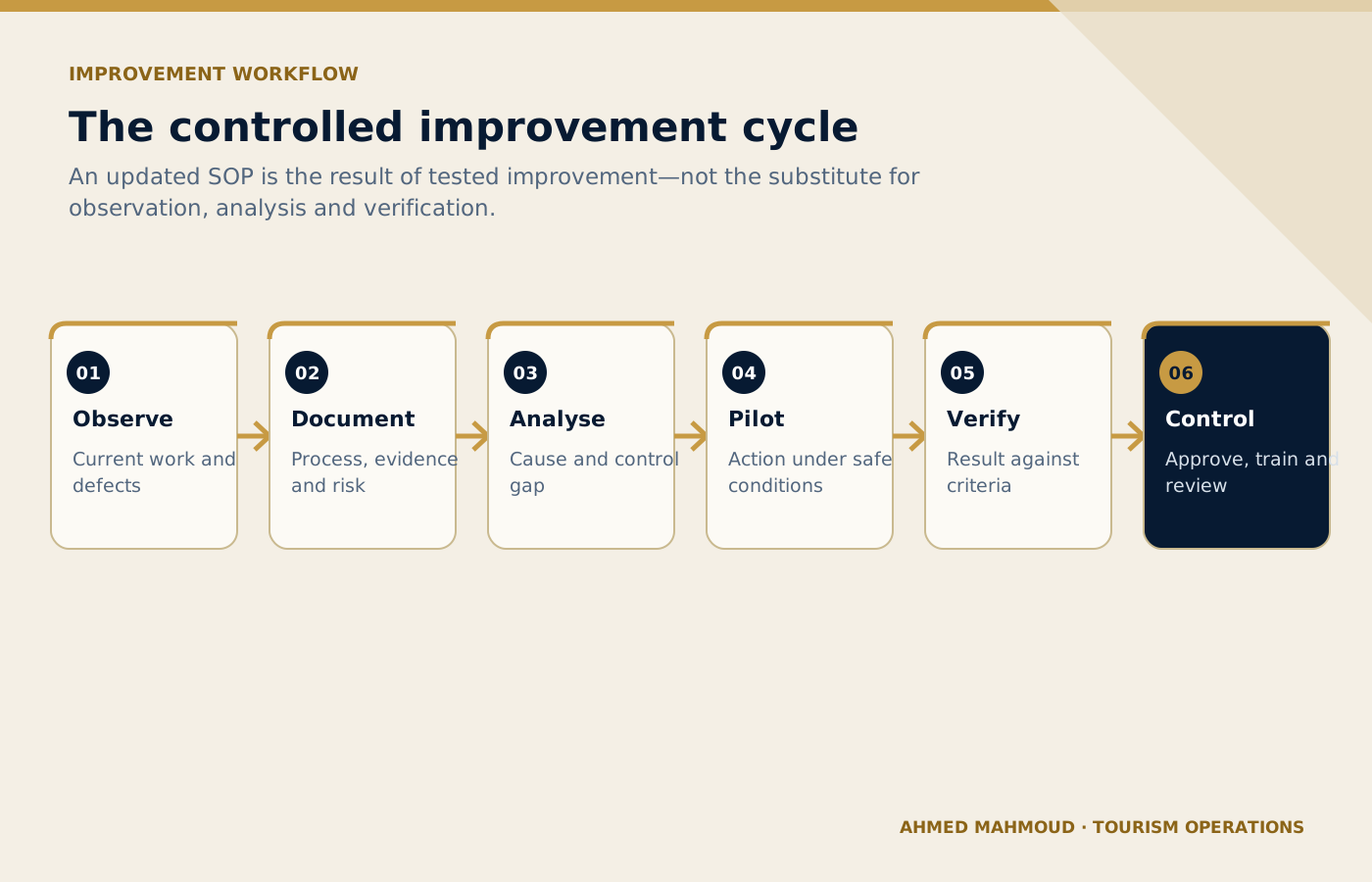
The SOP is updated after an improvement is tested and verified, not used as a substitute for field validation.
On small screens, scroll the diagram horizontally to read its labels.
#Common mistakes to avoid
- Mistake 1: Writing an SOP from management assumptions without observing the job.
- Mistake 2: Stopping a Five Whys analysis at “human error”.
- Mistake 3: Mixing facts, opinions and proposed actions in an incident report.
- Mistake 4: Creating a long audit checklist that misses critical controls.
- Mistake 5: Closing corrective action without effectiveness evidence.
A useful internal review question is: “Could a new employee read this output and mistake a proposal for a confirmation?” If the answer is yes, revise the prompt and output labels before use.
#Implementation guidance for tourism teams
Select one recurring operational failure and collect real evidence. Map the current process with front-line employees, use the relevant prompt to structure analysis and assign an owner, due date and effectiveness measure. Update the SOP only after the improved process is tested.
Choose a low-risk, frequent task with a clear owner and source of truth.
Run realistic anonymised cases, including missing data and operational exceptions.
Document the prompt version, permitted users, tool, reviewer and release criteria.
Track quality, time saved, defects, escalations and employee feedback.
Update the prompt when the process, destination, supplier or risk changes.
#Final verification checklist
#Use AI to strengthen tourism judgement, not to bypass it
The best result is not the longest response or the most impressive wording. It is an output that helps a trained tourism professional see the situation clearly, find missing information early, communicate consistently and make a controlled decision. Keep the TRAVEL framework, verification table, privacy boundaries and human sign-off visible every time the prompt is adapted.
#Questions tourism teams ask
Can AI write an SOP?
It can structure a draft from verified process information. The process owner and employees who perform the work must validate every step.
How does Lean Six Sigma apply to tourism?
It helps teams define service problems, measure evidence, identify causes, improve handovers and control the new process while protecting guest experience.
What is wrong with “human error” as a root cause?
It does not explain why the system allowed the error. Training, workload, information, interface, procedure, supervision and environment should be examined.
What is CAPA?
Corrective and preventive action is a controlled plan to remove causes of an existing issue and reduce the risk of similar issues elsewhere.
How is effectiveness checked?
Use a defined indicator, sample, observation period and acceptance criterion after implementation rather than relying on completion alone.
Professional verification reminder: Always compare AI output with approved internal systems, official sources and qualified human judgement before it affects a guest, supplier, employee or commercial commitment.
Connect this guide to your next step
Continue with related methods and the wider series.
- Related guideThe DMC Operations AI Toolkit: 10 Ready-to-Use Prompts for Daily Tour Operations
DMC operations teams can use AI to organise files, identify gaps and structure briefs, but confirmations, assignments and disruption decisions must stay in approved systems.
- Related guideFront-Line Tourism AI Toolkit
Front-line teams can use AI to prepare, practise and communicate more consistently, while verified facts, empathy, safety and live decisions remain with the employee.
- Related guideThe Guest Experience AI Toolkit: 10 Prompts for Communication, Complaints, and Service Recovery
AI can support consistent guest communication and feedback analysis, while facts, privacy, empathy, recovery authority and accountability remain human responsibilities.
Put this article into practice
- Use the prompts to structure process mapping, SOP drafts and quality analysis while keeping evidence and validation with the process owner.
- Verify the supplied facts and record any missing evidence before acting.
- Name the accountable owner and confirm the decision or approval limits.
- Test the result in the operating context and retain the verification record.
Your next step
Supply the required inputs, copy the complete prompt and verify the output before using it in the operation.
Apply SOP Creation