

- Who this helps
- Tourism quality managers, document controllers and department supervisors.
- What you can do
- Design a hierarchy that connects policy, SOPs, instructions, checklists and records around real operating tasks.
#Why a hierarchy becomes necessary
Most tourism companies do not begin with a designed documentation system. Documents appear as the business grows: a client sends a service standard, a manager writes an airport procedure, a supervisor creates a checklist, a trainer prepares a guide, Finance adds an approval form, and employees build message templates in personal folders.
Each item may solve an immediate problem. Over time, however, the organization develops a different problem: no one can see how the documents relate.
Two airport-transfer procedures contain different waiting rules. An old hotel-departure briefing remains in a messaging group. A checklist includes a field that no system uses. A manager updates a template without changing its version. A policy says one thing while a client-specific instruction says another. Employees ask experienced colleagues which file is “the real one.”
A document hierarchy creates order by answering four questions:
- Which information sets direction?
- Which information governs processes?
- Which information helps people execute tasks?
- Which information demonstrates performance and improvement?
ISO 10013:2021 gives organizations flexibility to develop documented information suited to their needs. It does not require every company to use the same levels or labels. The hierarchy in this article is therefore a practical tourism model, not an ISO-mandated structure.
#The purpose is navigation and control
A useful hierarchy makes the operating system understandable.
It should help an employee move from a high-level rule to the exact tool needed at the point of work. It should help a manager see whether a process has the necessary controls. It should help a reviewer identify the owner, current version, related documents, records, and measures.
The hierarchy should also prevent duplication. If the company’s approval authority is defined in a controlled matrix, every SOP should not invent its own limits. If the process map defines the booking-to-operation handoff, department procedures should reference that design rather than create competing flows.
Policy vs SOP vs Work Instruction vs Checklist vs Form vs Template explains the purpose of each document. The hierarchy connects them.
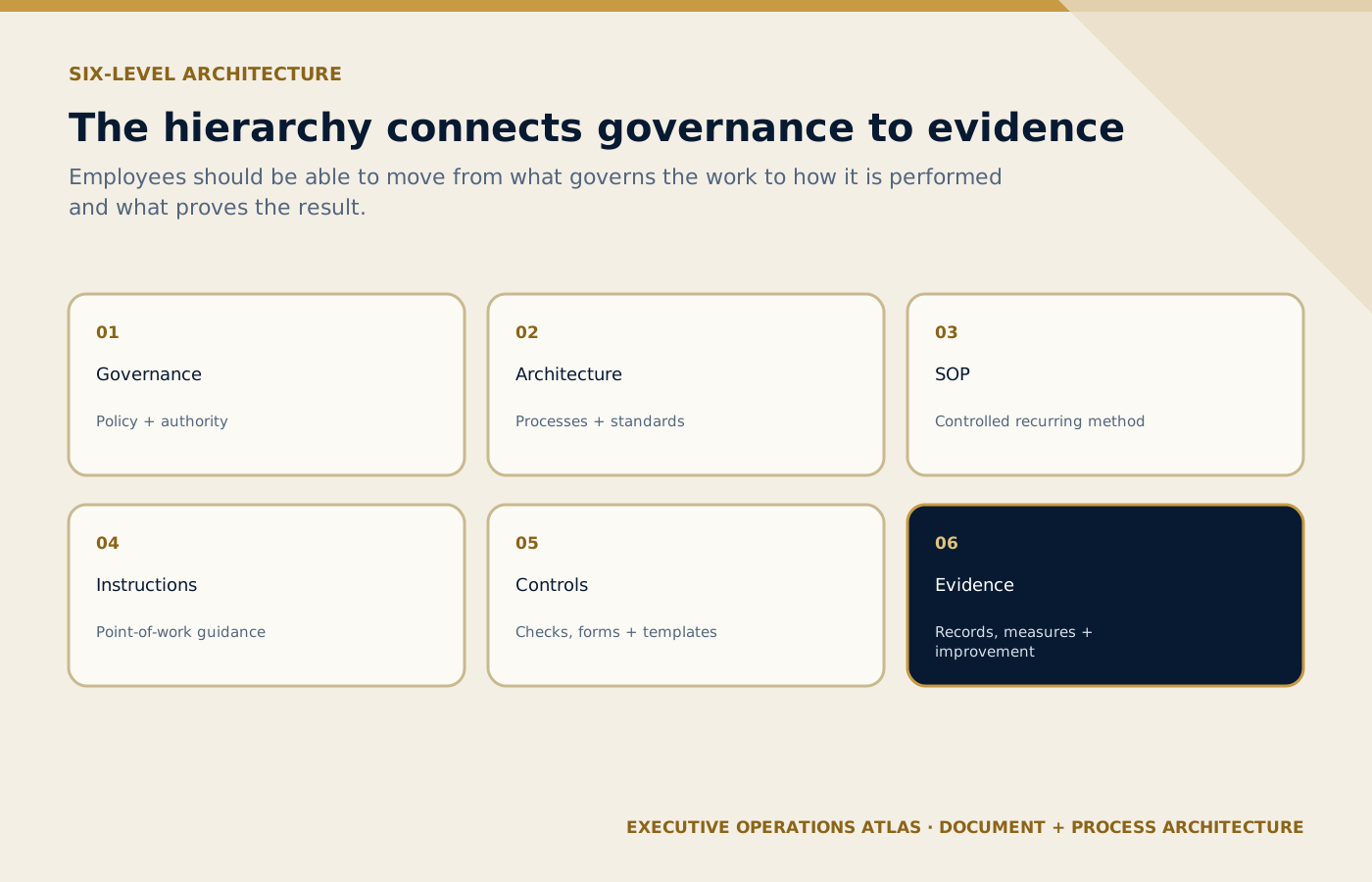
The six levels connect direction, operating design, execution support and retained evidence without turning hierarchy into bureaucracy.
On small screens, scroll the diagram horizontally to read its labels.
#A six-level hierarchy for tourism operations
#Level 1 — Corporate governance
This level contains the company’s direction, commitments, and organization-wide requirements.
Possible documents include:
- policies;
- corporate standards;
- code of conduct;
- risk and authority frameworks;
- privacy, safety, accessibility, quality, and supplier principles;
- management-system scope; and
- strategic objectives.
Examples:
- Tourism Service Quality Policy;
- Guest Safety and Duty-of-Care Policy;
- Accessible Service Policy;
- Information and Privacy Policy;
- Supplier Governance Policy; and
- Operational Authority Matrix.
Level 1 should be stable and approved at the appropriate management level. It defines what must be true across the company without describing every department’s sequence.
#Level 2 — Process architecture and operating standards
This level shows how the business delivers its promises. It contains end-to-end process maps, process definitions, cross-functional standards, and the process register.
Examples:
- Sales-to-Operations Handover Process;
- Airport Transfer Process;
- Excursion Delivery Process;
- Guest Complaint and Recovery Process;
- Supplier Onboarding and Performance Process;
- Tour Quotation and Approval Process;
- MICE Movement Control Process; and
- Incident and Corrective-Action Process.
Each process definition should identify purpose, boundary, owner, inputs, outputs, customers, roles, systems, key risks, documents, records, and measures.
This level prevents departments from designing isolated solutions. It gives SOP writers an approved map of the work.
#Level 3 — Standard operating procedures
This level governs recurring processes or subprocesses.
Examples:
- Airport Arrival Transfer SOP;
- Departure Transfer SOP;
- Daily Fleet Dispatch SOP;
- Hotel Hospitality Desk SOP;
- Tour Guide Assignment SOP;
- Guest No-Show SOP;
- Supplier Confirmation SOP; and
- After-Hours Operations SOP.
The SOP should reference its governing policy and process, related instructions and tools, required records, and applicable measures. It should also define exceptions and escalation.
SOPs should not be created simply because a department wants a file with its name. The scope should follow a meaningful process boundary.
#Level 4 — Work instructions and job aids
This level provides precise task guidance.
Examples:
- Verify Flight Status;
- Update the Dispatch Board;
- Prepare Airport Signage;
- Check Vehicle Readiness;
- Verify Attraction Ticket Conditions;
- Register a Guest Complaint; and
- Close a Completed Service.
Work instructions may change more often than SOPs because systems and interfaces change. Separating them protects the stability of the procedure while giving employees current detail.
Job aids may include decision trees, quick-reference cards, field guides, diagrams, or short prompts. They must remain traceable to the controlled method.
#Level 5 — Operational controls and communication tools
This level supports execution and structured capture.
Examples include:
- readiness checklists;
- forms;
- manifests;
- logs;
- briefing templates;
- supplier confirmations;
- guest-message templates;
- incident forms;
- handover sheets; and
- approved calculation worksheets.
The blank tool is maintained as controlled information. The completed tool may become a record. The owner should define whether completion is mandatory, which fields are required, who approves it, where it is stored, and how long it is retained.
#Level 6 — Evidence, performance, and improvement
This level contains retained records and management information showing what occurred and how the system is performing.
Examples include:
- completed manifests and checklists;
- service and dispatch logs;
- incident and complaint records;
- training and competence evidence;
- supplier-performance reports;
- KPI dashboards;
- audit reports;
- root-cause analyses;
- corrective and preventive action records;
- management-review decisions; and
- approved change records.
This level closes the loop. Records should not sit in storage without purpose. They should support service evidence, legal or contractual obligations where applicable, measurement, learning, and improvement.
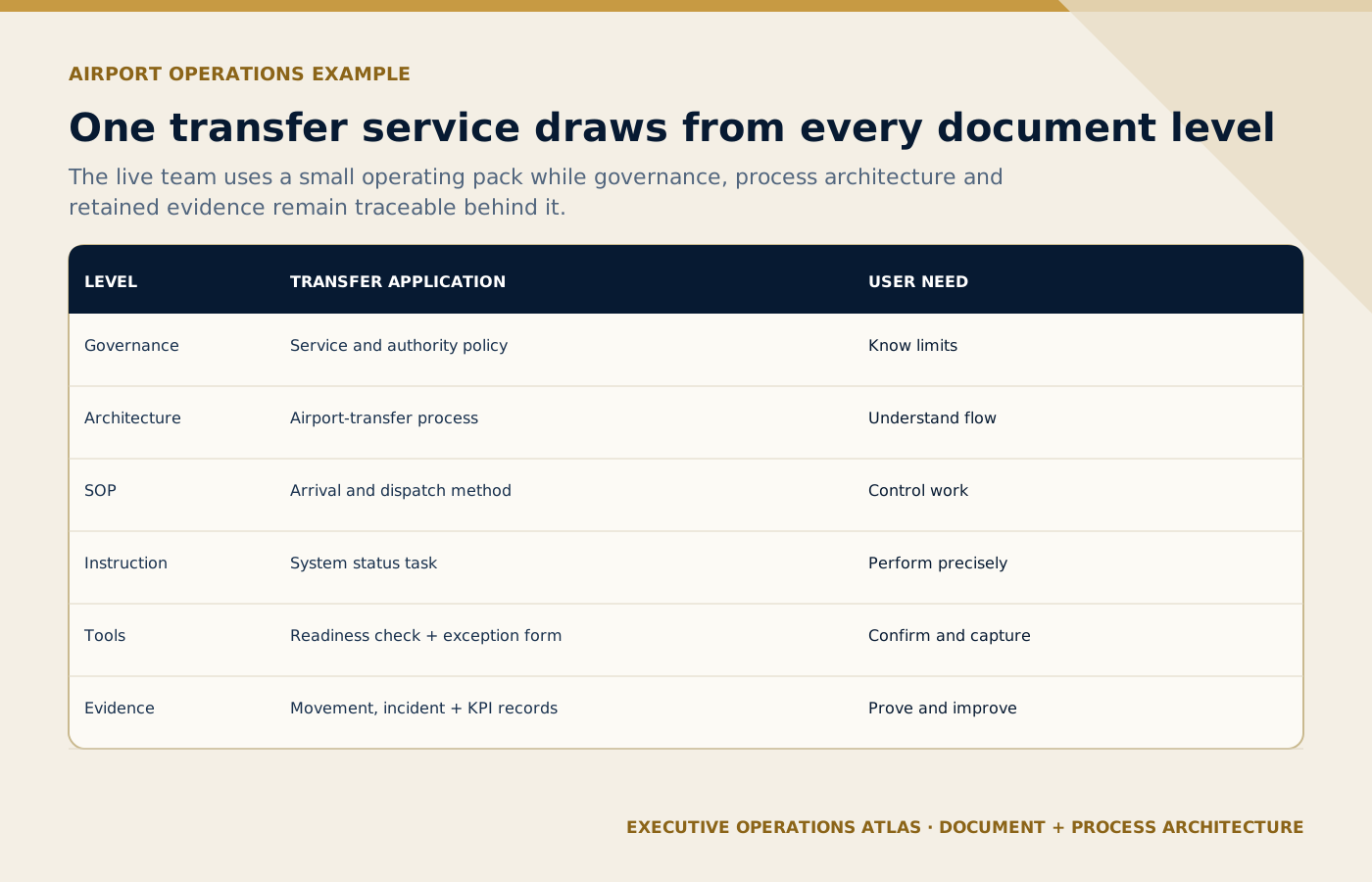
A live airport-transfer team uses a focused operating pack that remains traceable to governance, process architecture and evidence.
On small screens, scroll the diagram horizontally to read its labels.
#The hierarchy in one Airport Operations example
Illustrative scenario
Operational teaching scenario, not a documented incident. Uncited figures and outcomes are illustrative assumptions.
- Situation
At Level 1, a Guest Service and Safety Policy establishes management’s requirements. An authority matrix defines who may make material operational and financial decisions.
- Evidence
At Level 2, the Airport Transfer Process shows the flow from confirmed booking to service closure, including Sales, Reservations, Operations, Transport, Airport Team, Guest Service, and Finance.
At Level 3, the Airport Arrival Transfer SOP defines preparation, monitoring, meeting, vehicle release, transfer, closure, and exception control.
At Level 4, work instructions explain how to verify flight status, prepare signage, update the dispatch system, and record a guest search.
At Level 5, employees use the operating manifest, readiness checklist, no-show form, guest-message template, supplier confirmation, and shift-handover sheet.
At Level 6, completed records support KPIs, supplier review, incident analysis, audit, and improvement.
The hierarchy creates traceability in both directions. A manager can move from a policy requirement down to the field tool. An employee or auditor can move from a completed record back to the procedure and policy that governed the work.
Check the approved service brief, current passenger count, confirmed vehicle and driver, access conditions, deadlines and activation authority.
- Decision
Decide whether to release, wait, reroute or activate the approved backup using verified readiness and the stated decision deadline.
- Action
Assign the movement owner, obtain the required approval, communicate the plan to the next team and log the change against the service reference.
- Verification
Reconcile the physical count with the movement record, confirm the receiving team’s handover and keep unresolved passengers or tasks open.
#Do not confuse hierarchy with importance
A Level 4 work instruction is not unimportant because it is “lower.” It may contain the detail that prevents a serious error. A Level 5 checklist may be critical before a coach departs. A Level 6 record may be essential during a dispute or investigation.
The levels describe function and relationship, not value.
Similarly, not every process needs all document types. A short, low-risk process performed by competent staff may be controlled by a process definition, simple procedure, and record. A complex MICE movement may need several SOPs, instructions, checklists, forms, templates, fallback plans, and dashboards.
The hierarchy must remain proportionate to risk, complexity, competence, legal and contractual requirements, service variability, supplier dependence, and the consequences of failure.
#Build a document register before building more documents
Before designing the future hierarchy, inventory what exists.
The document register should include:
- document identifier;
- title;
- type and level;
- process and department;
- owner and approver;
- current version and effective date;
- status;
- location/source of truth;
- related documents and records;
- review date;
- access classification; and
- replacement or retirement action.
Do not trust filenames alone. Review actual content, usage, and distribution. Two files may have different names but duplicate the same rule. One file may be obsolete but still actively used in a chat group.
Classify each item:
- keep and control;
- revise;
- merge;
- split;
- convert to another document type;
- archive as a record;
- retire; or
- investigate.
This inventory often produces more value than writing the next requested SOP.
#Design identifiers people can understand
A document identifier should be unique, stable, and meaningful enough for administration without becoming an unreadable code.
One possible model is:
OPS-APT-SOP-001
OPS: function or management system;APT: process or domain;SOP: document type; and001: unique sequence.
Examples:
OPS-APT-MAP-001— Airport Transfer Process Map;OPS-APT-SOP-001— Airport Arrival Transfer SOP;OPS-APT-WI-003— Verify Flight Status;OPS-APT-CHK-002— Airport Readiness Checklist;OPS-APT-FRM-004— Guest No-Show Form; andOPS-APT-TPL-003— Missing-Guest Client Update.
Codes should not carry information likely to change, such as the current department name, author, or year, unless the organization has a strong reason. The title provides human meaning; the code provides stable identification.
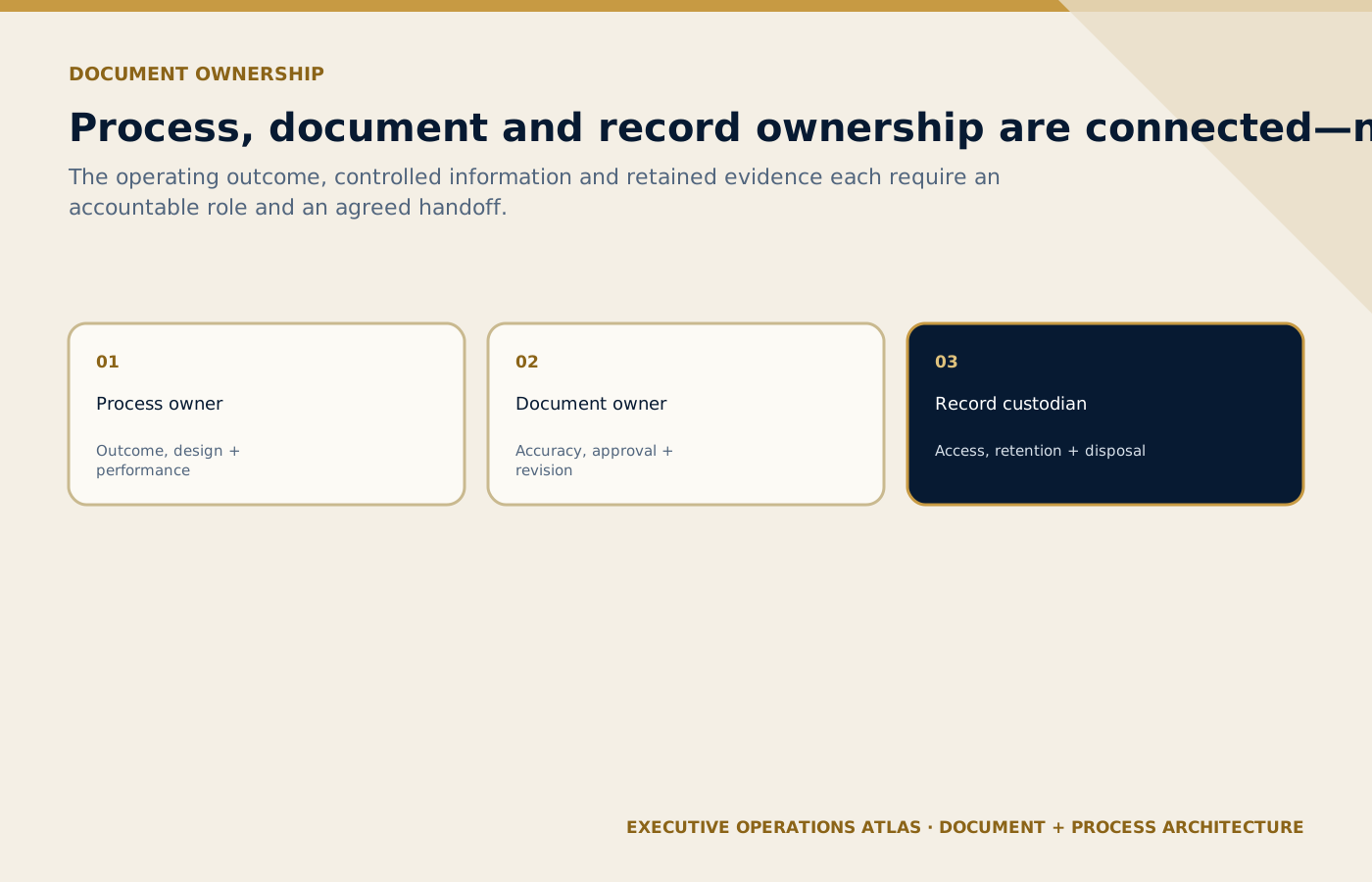
Process, document and record owners carry connected but distinct accountabilities across the information lifecycle.
On small screens, scroll the diagram horizontally to read its labels.
#Define ownership at three levels
#Process owner
Accountable for the end-to-end process, outcomes, risks, measures, and improvement.
#Document owner
Accountable for the accuracy, relevance, review, and coordination of a specific controlled document.
#Record owner or custodian
Accountable for storage, protection, retrieval, retention, and disposal of records.
These roles may be held by the same person in a small company, but the responsibilities remain distinct. “Quality owns all documents” is rarely sustainable. Quality can govern the system; operational owners must own operational truth.
#Handle client and supplier documents deliberately
Tourism companies often receive external documents: client standards, supplier procedures, airport instructions, venue plans, hotel loading rules, attraction conditions, and authority notices.
The hierarchy should define:
- which external documents are controlled;
- who monitors changes;
- how applicability is assessed;
- how conflicts with internal documents are resolved;
- how relevant requirements reach employees and suppliers; and
- what happens when an external source changes during a live programme.
A client-specific instruction may override a standard operating choice within approved limits, but it should not silently contradict safety, legal, contractual, or governance requirements. Conflicts need a defined decision path.
#Integrate digital tools without losing control
Documented information may live in software, not only files. A dispatch workflow, required system field, automated validation, prompt library, or dashboard may carry a control.
The hierarchy should include those controls in the process architecture and register. The organization must still define ownership, authorization, change control, testing, access, backup, and evidence.
The existing Responsible AI for Tourism article provides a useful analogy: an approved prompt or AI workflow requires governance, version control, human verification, and incident handling. A digital format does not remove document-control principles.
#Common hierarchy failures
#Copying a large-company model
An SME adopts six approval signatures and hundreds of codes because the model looks professional. Employees work around it. Design for the organization’s real risk and capacity.
#Organizing only by department
Guests and information move across departments. A department-only library hides the end-to-end process and creates duplicate rules.
#Making the folder structure the hierarchy
A shared-drive folder is a location, not a governance model. The same document may support several processes. Metadata and a register are more reliable than nested folders alone.
#Mixing blank tools and completed records
Employees may overwrite the master form, use a completed case as a template, or expose personal information. Separate controlled templates from retained records.
#Giving every document the same review cycle
A stable policy, frequently changing attraction instruction, seasonal itinerary checklist, and emergency contact list do not have the same change profile. Set risk-based review triggers.
#Retiring a file without removing access
The register says obsolete, but printed and downloaded copies remain active. Document Control & Version Management addresses distribution and withdrawal.
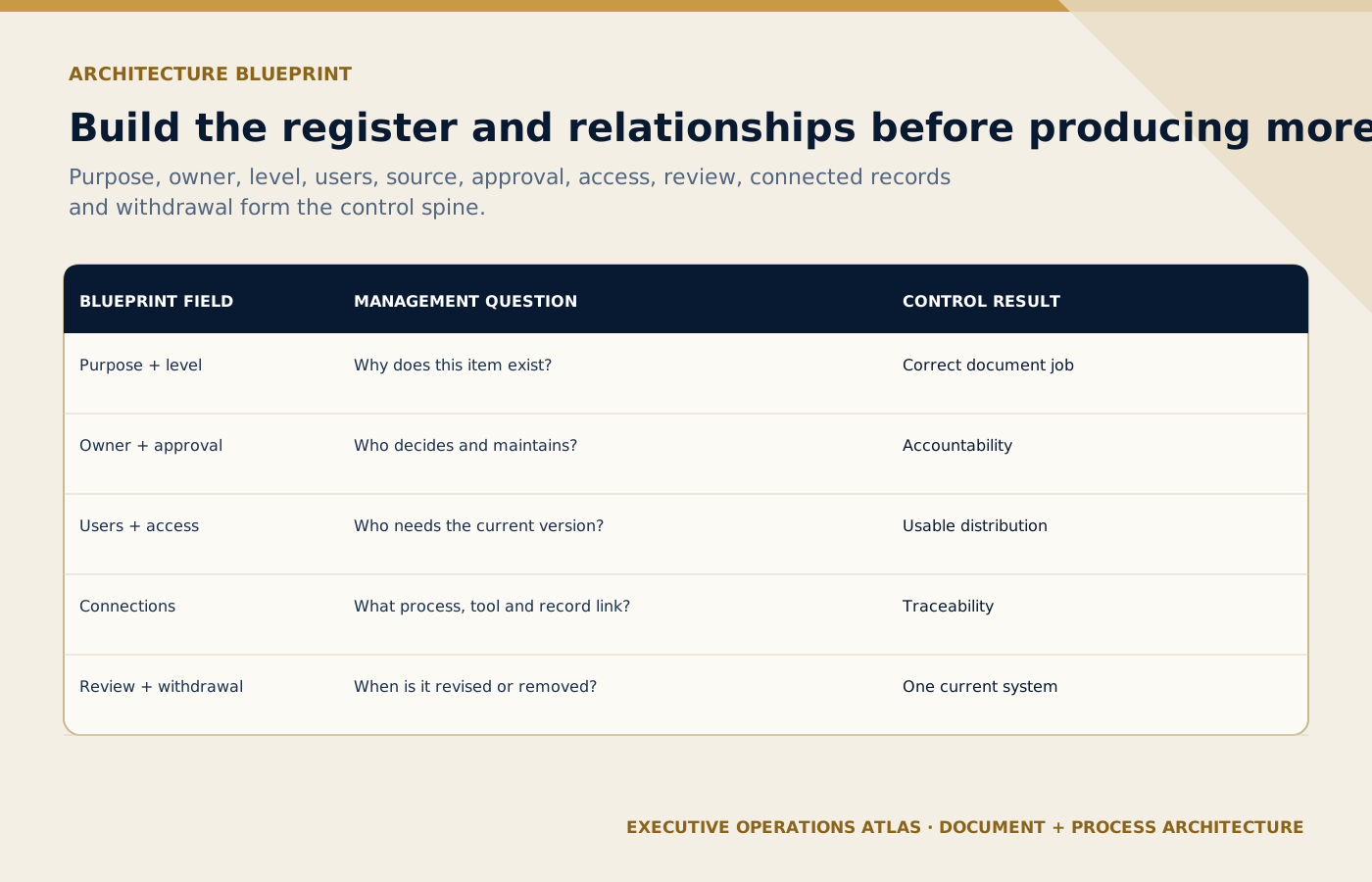
A controlled register and relationship model should exist before the company creates additional documents.
On small screens, scroll the diagram horizontally to read its labels.
#Practical tool: Tourism Document Architecture Blueprint
Build the architecture process by process.
| Component | Output |
|---|---|
| Management-system scope | Define business units, locations, services, and exclusions. |
| Process catalogue | List core, support, management, and improvement processes. |
| Process owners | Assign accountable roles. |
| Level definitions | Approve the document types and purpose of each level. |
| Naming and coding | Define titles, identifiers, and metadata rules. |
| Required document sets | Map policies, SOPs, instructions, tools, records, and measures to each process. |
| External documents | Define sources, owners, monitoring, and conflict resolution. |
| Digital controls | Register workflow, system, prompt, and dashboard controls. |
| Access and distribution | Define source of truth, permissions, point-of-work access, and fallback. |
| Review and change | Define triggers, approval, release, withdrawal, and emergency change. |
| Record governance | Define evidence, retention, privacy, protection, and disposal. |
| Assurance | Define audits, usage checks, KPI review, and management oversight. |
Scroll horizontally to read every column. Keyboard: focus the table, then use the arrow keys.
What to learn: Read each row across to connect Component with Output. Compare the rows to identify the relevant component for your situation; use the accompanying section to interpret the result.
Start with one pilot process. Validate the levels and codes against real use before converting the entire library.
#A practical implementation sequence
- Define scope and principles. Agree that the hierarchy exists to support work and evidence.
- Catalogue processes. Do not begin with the folder tree.
- Inventory existing information. Include files, systems, templates, records, and external sources.
- Approve level definitions and ownership. Use language employees understand.
- Design naming, coding, and metadata. Keep the system stable and searchable.
- Pilot one process. Airport transfers or complaint management often reveal many relationships.
- Remove duplication and conflict. Preserve necessary evidence before retirement.
- Test point-of-work access. Check phone, desktop, printed fallback, and after-hours use.
- Train users by role. Explain how to find the current information and report a problem.
- Audit usage and improve. The hierarchy is only successful if it helps people operate.
#Final perspective
A document hierarchy gives the tourism operating system a visible structure. It connects management intent to process design, controlled execution, field tools, evidence, performance, and improvement.
The hierarchy should be simple enough that an airport representative can find the right checklist, strong enough that a manager can control change, and connected enough that the organization can learn from its records.
The goal is not a perfect pyramid on a presentation slide. The goal is one coherent route from “what management requires” to “what happened in the operation and what we will improve next.”
- The Operating System Behind a Professional Tourism Company
- Policy vs SOP vs Work Instruction vs Checklist vs Form vs Template
- Document Control & Version Management
- Existing portfolio: The Tourism Quality and SOP AI Toolkit
- Existing portfolio: Tour Quotation & Pricing Masterclass
#Sources and further reading
Primary standards, institutional guidance and professional references used to support this article.
- ISO 10013:2021, Guidance for documented information
- ISO 9000 family — Quality management
- ISO 10007:2017, Guidelines for configuration management
- ISO, The process approach in ISO 9001:2015
- ISO 22483:2020, Hotels — Service requirements
- ISO 21902:2021, Accessible tourism for all
Editorial note: The six-level model and coding examples are recommendations. Organizations should tailor their architecture to applicable obligations, risks, competence, complexity, technology, contracts, and service context.
Connect this guide to your next step
Continue with related methods and the wider series.
- Related guideThe Operating System Behind a Professional Tourism Company
A tourism company does not become reliable because it owns a folder called “SOPs.” It becomes reliable when policies, processes, people, tools, records, measures, and improvement routines work as one operating system.
- Related guideFrom SOP Library to Tourism Operational Excellence Management System
Transform a collection of controlled documents into an integrated system that aligns value, governance, capability, execution, evidence, measurement, learning, and sustained service excellence.
- Related guideHow to Write a Professional SOP: Part 1 — Structure
A professional SOP is not a long checklist and not a policy essay. It is a controlled operating document that connects purpose, scope, roles, procedure, exceptions, records, measures, approval, and revision.
Put this article into practice
- Design a hierarchy that connects policy, SOPs, instructions, checklists and records around real operating tasks.
- Verify the supplied facts and record any missing evidence before acting.
- Name the accountable owner and confirm the decision or approval limits.
- Test the result in the operating context and retain the verification record.
Your next step
Use this connected method when you are ready to give each document type a clear purpose and connect it to the work and evidence it supports.
Review Policy vs SOP vs Work Instruction vs Checklist vs Form vs Template