

- Who this helps
- Tourism supervisors, process owners and checklist designers.
- What you can do
- Choose critical pause points, write observable checks and define what staff should do when a check fails.
#The operating problem
A checklist is a focused cognitive aid for critical actions or confirmations. It should not reproduce the full SOP, substitute for competence, or become a ceremonial sign-off completed after the work. Tourism work makes this discipline unusually important. A single service may join Sales, Reservations, Operations, a hotel, an airport team, a transport partner, a guide, a client, and the guest. Information changes while the service is live, and the person who notices a problem may not hold the authority to change cost, timing, supplier, or customer promise. The document therefore has to work as an operating interface, not simply as well-written office content. The starting point is the broader system described in the operating-system overview. That system separates governance, execution, evidence, measurement, and improvement. The present article focuses on one controlled component, while the document-type comparison explains why an SOP, work instruction, checklist, form, template, and record should not be asked to perform the same job. This is a practical management model, not a universal template imposed by ISO or a substitute for applicable law, contract terms, safety requirements, privacy advice, or emergency arrangements. An organization should tailor the depth, approval, terminology, and retained evidence to its services, risk, size, jurisdiction, technology, and competence. Approval should therefore be evidence-led. Reviewers should see the mapped work, representative records, relevant risk and guest requirements, user-test observations, and unresolved issues—not only the polished draft. That evidence makes the approval decision explainable and gives the owner a baseline for measuring whether the released control improves real performance.
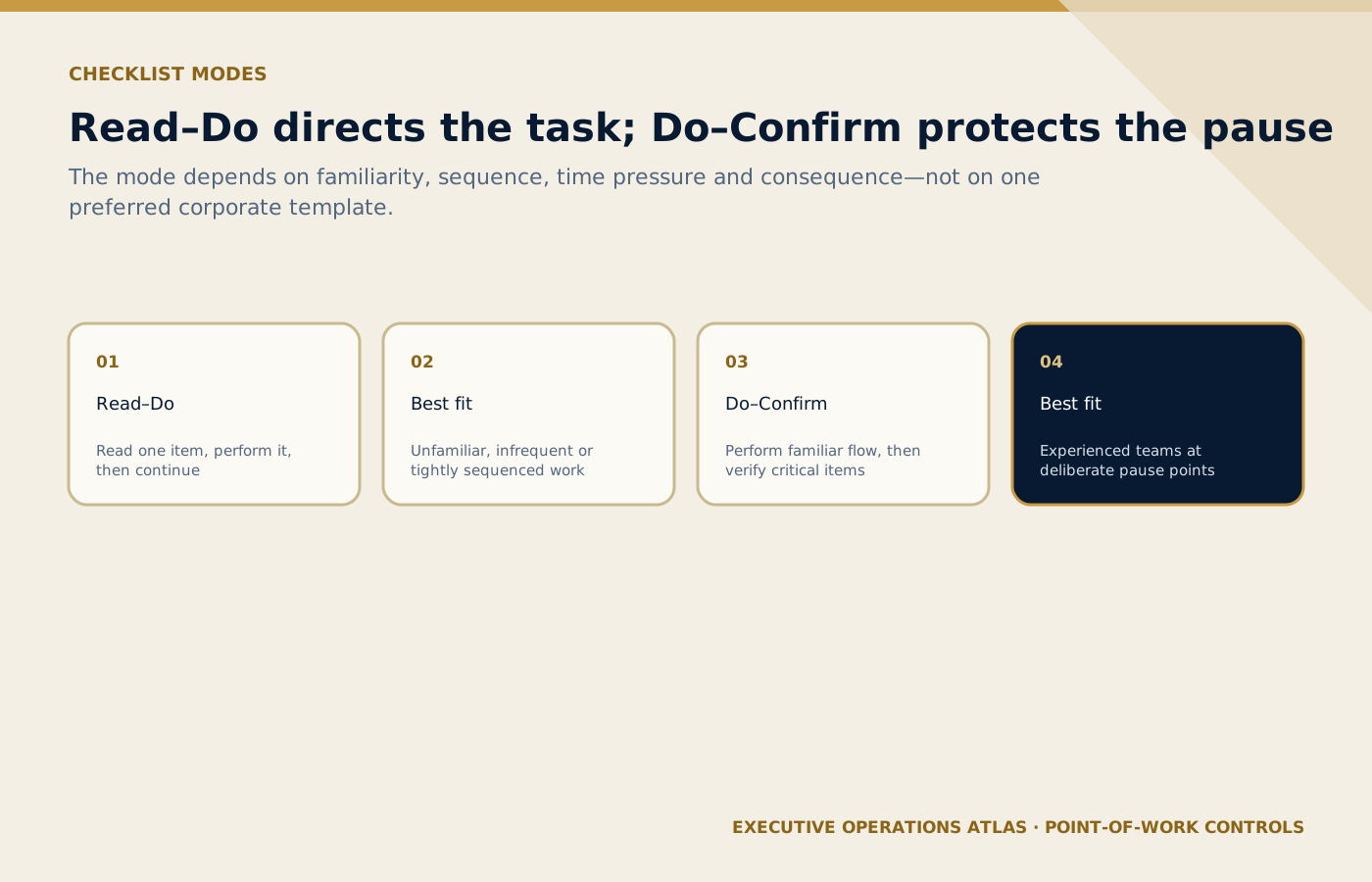
The correct mode reflects user familiarity, sequence, pressure and consequence rather than one universal checklist format.
On small screens, scroll the diagram horizontally to read its labels.
#The distinctions that prevent document failure
In a Read–Do checklist, the user reads an item and performs it before moving on. It suits unfamiliar, tightly sequenced, or infrequent work. In a Do–Confirm checklist, trained staff perform a familiar flow and pause to verify critical items. A checklist item should be observable: ‘coach bay confirmed with venue’ is testable; ‘ensure smooth departure’ is not. The item can point to a work instruction when technical detail is required. Yes/No/N/A can support review only when N/A is legitimately defined and ‘No’ opens an action path. Otherwise the response format encourages box-ticking instead of control. Completion evidence should be proportionate to risk. The company may need named sign-off for a safety-critical or commercial release, but not a timestamp for every routine mental check.
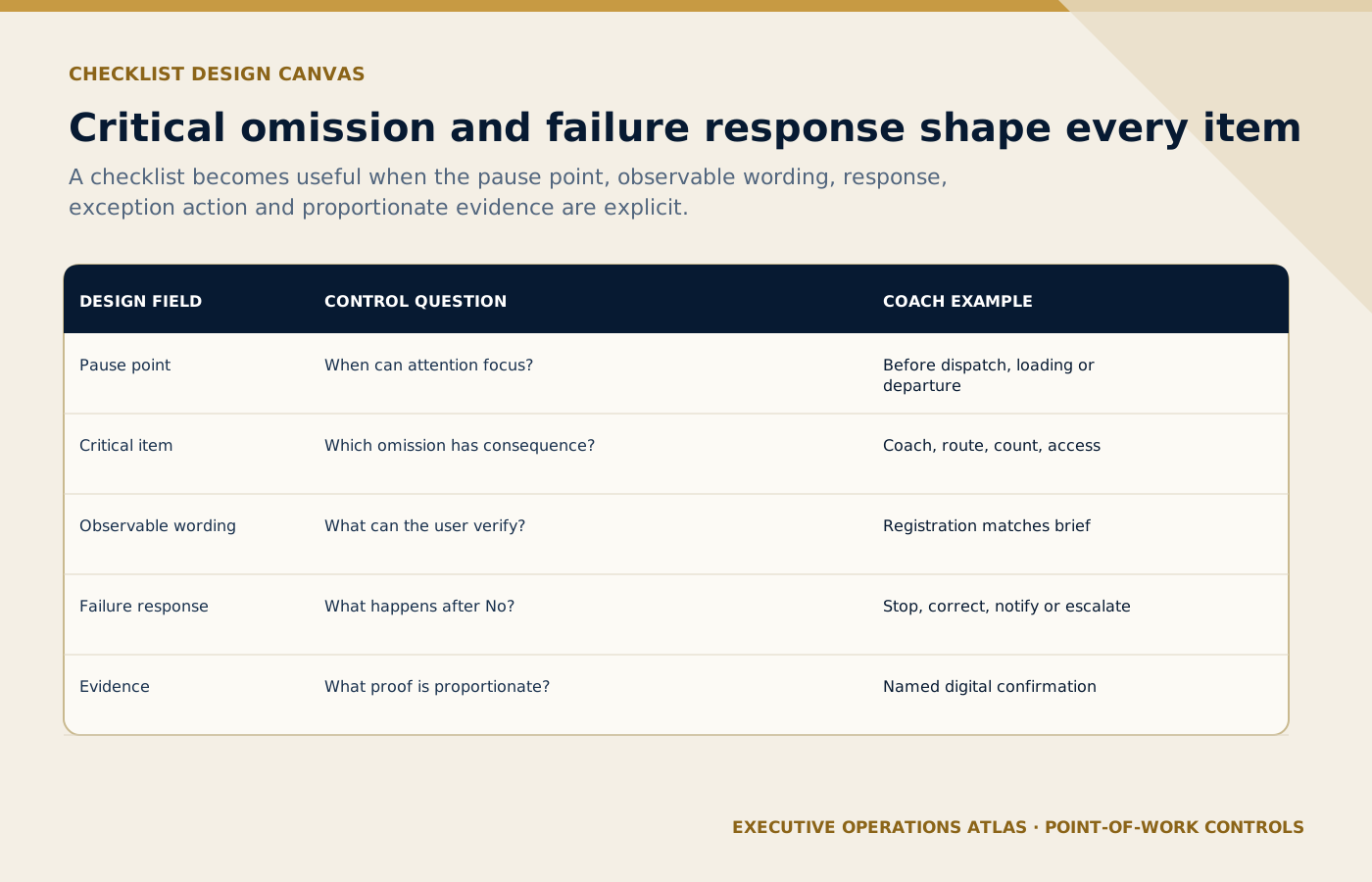
A checklist item becomes a control only when its status is observable and a failed check opens a defined action route.
On small screens, scroll the diagram horizontally to read its labels.
#Practical tool: Read–Do and Do–Confirm checklist design canvas
The following canvas is designed for a working session, not decorative inclusion in a manual. Complete it using a real service and current records. Every answer should be specific enough for another role to validate.
| Element | Control question | Tourism example |
|---|---|---|
| Pause point | When is attention deliberately focused? | Before dispatch, before loading, before departure |
| Critical item | What omission would materially affect service? | Correct coach, route, guest count, accessibility, contact |
| Observable wording | What can the user confirm? | Vehicle registration matches movement brief |
| Response | How is status shown? | Done, No, N/A with reason |
| Exception | What happens when the check fails? | Stop, correct, notify, or escalate |
| Evidence | What completion record is proportionate? | Named digital confirmation at the pause point |
Scroll horizontally to read every column. Keyboard: focus the table, then use the arrow keys.
What to learn: Read each row across to connect Element with Control question, Tourism example. Compare the rows to identify the relevant element for your situation; use the accompanying section to interpret the result.
The table is intentionally compact. Supporting detail should live in the appropriate controlled document or system rather than expanding one tool until it becomes impossible to use. During review, mark assumptions, unresolved authority, weak inputs, and missing evidence separately; do not convert them into confident statements merely to finish the template.
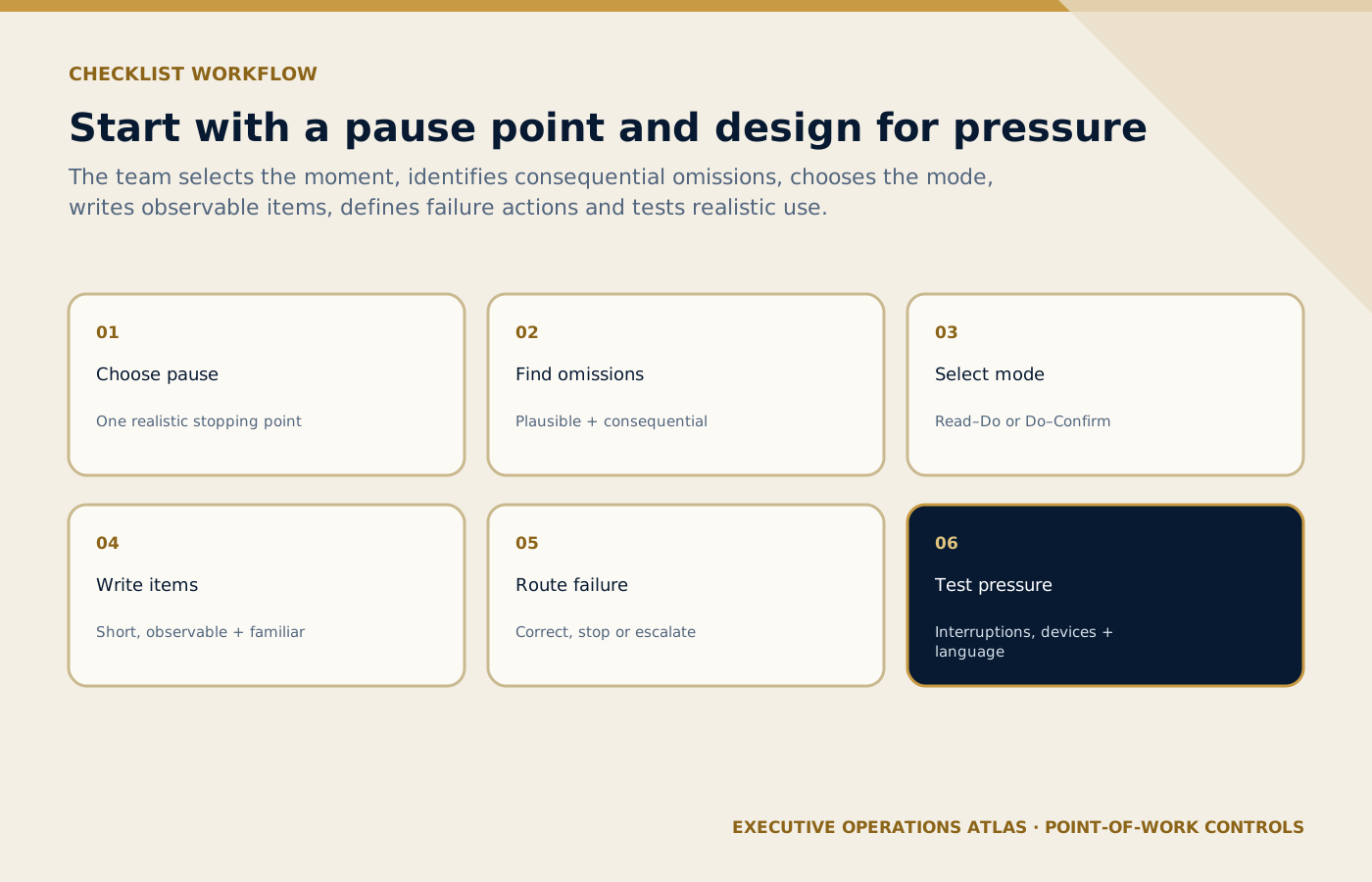
The design begins with a realistic pause and retains only consequential, observable checks that users can perform under pressure.
On small screens, scroll the diagram horizontally to read its labels.
#A professional design workflow
#Select a specific pause point
Avoid a single checklist covering an entire shift. Place a short aid where a team can realistically stop: vehicle release, guest loading, attraction departure, or service close-out.
#Identify critical omissions
Use process maps, risk assessments, complaints, and field observation to find items whose omission is plausible and consequential. Do not include every good practice simply because it is true.
#Choose Read–Do or Do–Confirm
Match the mode to familiarity, sequence, time pressure, and consequence. Label the mode in training so users understand whether the list directs the task or verifies a completed flow.
#Write short observable items
Use one idea per line, familiar operational language, and the value to be checked. If an item requires a paragraph, move the method into the SOP or work instruction.
#Design the exception response
For each ‘No’, define whether the user corrects the issue, stops release, contacts a role, or records an authorized deviation. A checklist without a failure path only detects problems.
#Test under pressure
Observe use during a realistic service with interruptions, gloves, low light, noisy bays, mobile screens, and language needs where relevant. Revise based on skipped items and user explanations. After completing the workflow, test the connected design during a pre-departure coach checklist for a multi-hotel mice movement. Ask users to work from the draft and approved tools without whispered instructions. Any dependency on a particular manager's memory should be recorded, owned, and resolved through the correct control—document, system, authority, contract, resource, or competence—before release.
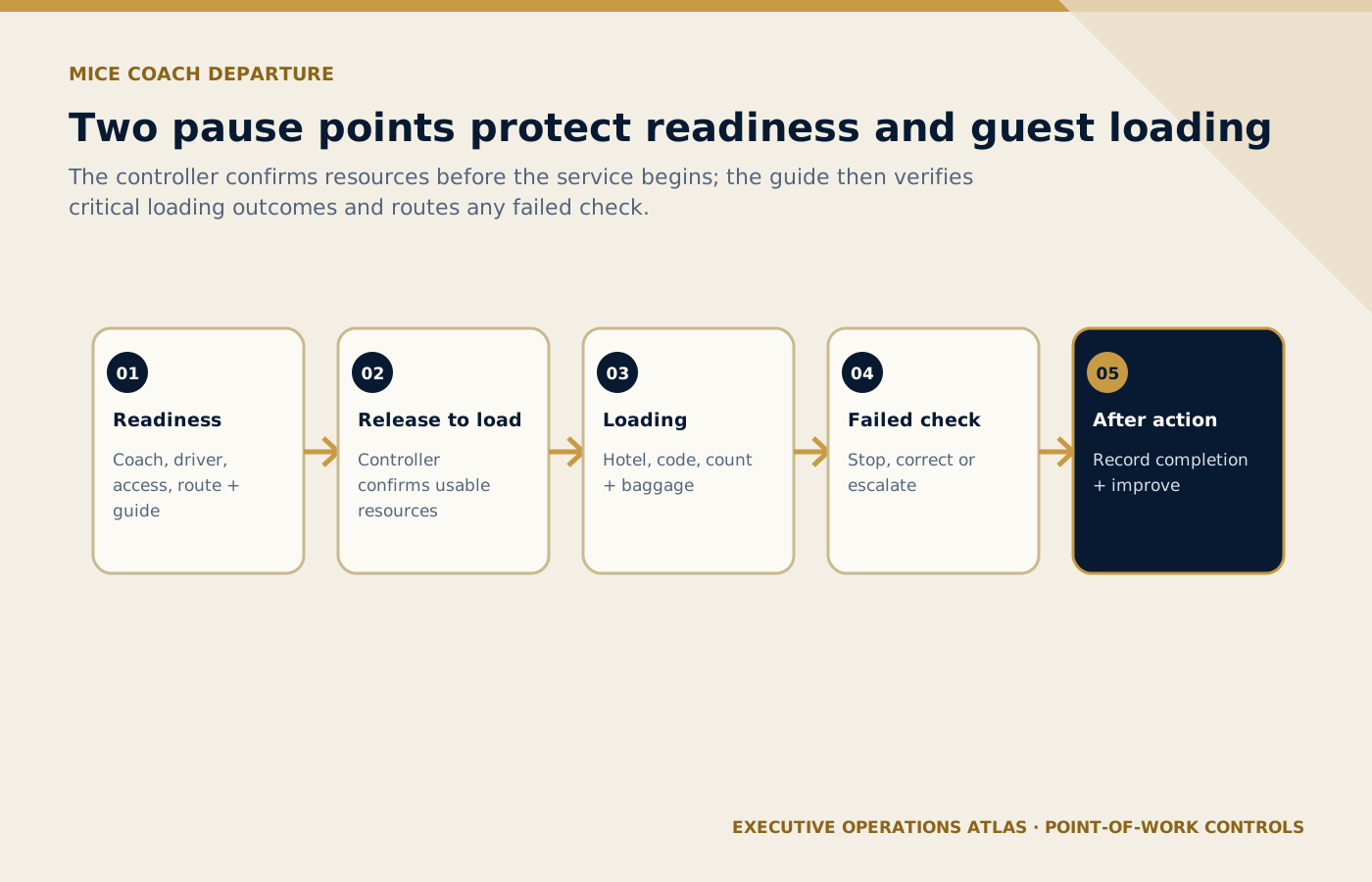
Controller readiness and guide loading checks protect different operating moments while sharing one explicit failure route.
On small screens, scroll the diagram horizontally to read its labels.
#Running example: A pre-departure coach checklist for a multi-hotel MICE movement
Illustrative scenario
Operational teaching scenario, not a documented incident. Uncited figures and outcomes are illustrative assumptions.
- Situation
A multi-hotel MICE movement needs a pre-departure checklist that makes failed checks visible.
- Evidence
Check the approved service brief, current passenger count, confirmed vehicle and driver, access conditions, deadlines and activation authority.
- Decision
Decide whether to release, wait, reroute or activate the approved backup using verified readiness and the stated decision deadline.
- Action
#Readiness pause
Thirty minutes before the first hotel departure, the controller confirms coach registration, driver contact, access, route, signage, water, mobility arrangements, and guide assignment.
#Loading pause
The guide performs the normal loading flow and uses a Do–Confirm list for hotel, movement code, guest count, baggage or equipment status, and missing-person escalation.
#Failed check
A registration mismatch is marked ‘No’. The list directs the controller to stop release, compare the approved assignment, contact Dispatch, and record the corrected vehicle.
#N/A control
A mobility-equipment check can be N/A only when the current guest/service brief confirms no requirement; the rationale is captured without disclosing unnecessary health information.
#After action
Supervisors review failed checks and repeated N/A use. The data identifies weak inputs or supplier performance rather than rewarding perfect-looking sheets.
The scenario should be validated against the service's current risk assessment and guest journey, not treated as a perfect script. Compare it with the methods in operational risk assessment before SOP writing and customer journey mapping for SOP design. Those articles help the team check whether an internally neat design also addresses operational uncertainty and the guest's visible experience.
#Common failure modes—and the design response
- Copying the entire sop into boxes. Use a recent case to show the operational consequence and identify the earliest control that could have prevented or detected it.
- Using vague items such as ‘all good’. Trace the issue across roles and handoffs; the visible error may originate in an earlier input, authority decision, or system rule.
- Placing checks after the point of no return. Decide whether the remedy belongs in this document, a supporting tool, the system, the contract, resource planning, or competence development.
- Allowing ‘no’ without an action. Test the proposed correction in a normal case and an exception so that solving one failure does not create another downstream.
- Using n/a as a shortcut. Assign an owner and evidence for the correction, then set a date to confirm that the failure has not simply moved into an unofficial workaround.
- Measuring completion rate while ignoring whether the check was timely or truthful. Where risk remains, record and escalate it explicitly rather than adding vague cautionary prose that no user can apply under pressure.
#Implementation and control
- Limit the first version to the critical few. Confirm the mandate, affected processes, and release decision so ownership does not disappear after the workshop.
- Involve experienced and new users. Schedule the work around live operations and include every shift, location, or partner needed to validate the design.
- Train the pause point and exception behavior. Keep an issue log with decision owner and due date; unresolved assumptions should never be disguised as approved instructions.
- Pilot without punishing honest ‘no’ entries. Define the evidence of readiness—approved content, system access, supporting tools, briefed partners, competent users, and supervisor cover.
- Review checklist value after incidents and operational changes. Set an early-use review and a routine review trigger, then route defects, competence gaps, and resource problems to different actions.
Implementation should be staged. Begin with a representative service, observe use, and correct design defects before large-scale release. Control the approved version through document control and version management, and use training, competency, and SOP adoption to distinguish a distribution list from genuine competence and adoption.
#Measures that show whether the control works
A useful measure should help the owner decide, not simply make a dashboard look complete. Establish a definition, data source, owner, review frequency, context, and action threshold for each selected measure.
Measures that show whether the control works — Measure, Learning goal Measure Learning goal Checklists completed at the intended pause point Whether the design is understood, usable, timely, and producing the intended operational evidence or outcome Failed checks corrected before release Whether the design is understood, usable, timely, and producing the intended operational evidence or outcome Items frequently skipped or marked n/a Whether the design is understood, usable, timely, and producing the intended operational evidence or outcome Incidents involving a listed control Whether the design is understood, usable, timely, and producing the intended operational evidence or outcome Average checklist duration Whether the design is understood, usable, timely, and producing the intended operational evidence or outcome Scroll horizontally to read every column. Keyboard: focus the table, then use the arrow keys.
What to learn: Read each row across to connect Measure with Learning goal. Compare the rows to identify the relevant measure for your situation; use the accompanying section to interpret the result.
Do not read one indicator in isolation. A perfect completion rate alongside rising clarification calls may indicate retrospective box-ticking. A temporary increase in reported exceptions can be healthy after training if staff have begun recording issues that were previously hidden. Pair compliance, outcome, user-friction, guest, and improvement signals.
- Verification
Reconcile the physical count with the movement record, confirm the receiving team’s handover and keep unresolved passengers or tasks open.
#Field review before approval
#Boundary
Does the document begin and end at points the team can identify, or does it absorb adjacent processes until no owner can validate it? State the trigger, completion condition, excluded work, and connected processes. Then follow one real job reference from start to finish and note every point where the draft crosses its own boundary.
#Roles and authority
Can every action and decision be traced to a current role, deputy, authority level, and escalation path across shifts and partners? Compare the draft with rosters, job descriptions, delegation limits, and partner contacts. Ask the night or weekend shift who actually decides when the named manager is unavailable.
#Time and sequence
Are triggers, deadlines, intervals, pause points, and handoffs measurable in the systems and working conditions actually used? Use timestamps from a normal case and a disrupted case. Replace vague timing with an observable event or controlled threshold, and confirm that the relevant system or record can capture it.
#Information quality
Are required inputs current, traceable, appropriately protected, and presented in a form that the receiving role can use without reinterpretation? Trace each critical value to its source, owner, format, and latest valid version. Resolve duplicate fields and define what the receiver does when two approved-looking sources disagree.
#Exceptions
Has the team tested delay, absence, conflicting information, technology failure, supplier failure, accessibility needs, and a changing guest situation? Run at least one scenario that exceeds front-line authority. Observe whether staff can recognize the trigger, stabilize the service, escalate with the right facts, communicate, and return the case to controlled closure.
#Evidence
Does the record capture timely facts, source, action, authority, and outcome without unnecessary personal data, speculation, or retrospective reconstruction? Reconstruct a recent event using only retained records. Missing links reveal where the design needs a prompt, automatic timestamp, approval trace, attachment rule, or clearer close-out responsibility.
#Guest experience
Does the control protect the guest's clarity, dignity, accessibility, time, and communication needs as well as the company's internal workflow? Walk through what the guest sees, hears, waits for, and must do. Check language, channel, physical access, assistance, uncertainty, and recovery rather than assuming internal compliance equals a good experience.
#Usability
Can representative users perform the work on the actual device or paper format, under interruption and time pressure, without unofficial notes? Watch rather than coach. Record where users pause, scroll, search, abbreviate, take screenshots, or switch to personal tools; those behaviors are design evidence, not merely user resistance.
#Partner interface
Do external providers understand the same requirement, status, contact, evidence, and change rules, including the right to raise a concern early? Ask the partner to explain the handoff in their own words and demonstrate the communication route. Resolve differences before release, especially around substitutions, delay, cost, guest contact, and retained evidence.
#Learning and review
Will operational data, user feedback, complaints, audits, and change triggers lead to a controlled revision rather than a parallel workaround? Name who reviews which signals, how often, and what action threshold applies. Connect urgent correction, routine revision, refresher training, supplier action, and formal improvement to distinct governance routes.
#How this article connects to the series
The most useful next readings are procedure-writing method, work-instruction design, training, competency, and SOP adoption. These links are conceptual rather than promotional: each one supplies a prerequisite, supporting control, or next implementation step. A reader should be able to follow the series from system design to live use and improvement without encountering a forced link in every paragraph. The portfolio already shows the operating context in Tour Guide Quality Index, The DMC Operations AI Toolkit, The Abu Dhabi MICE Movement Control Room. Those pieces provide concrete examples of journeys, dashboards, assignments, quality tools, commercial controls, partner handoffs, or service recovery. This article extends them by explaining the management method behind reliable execution.
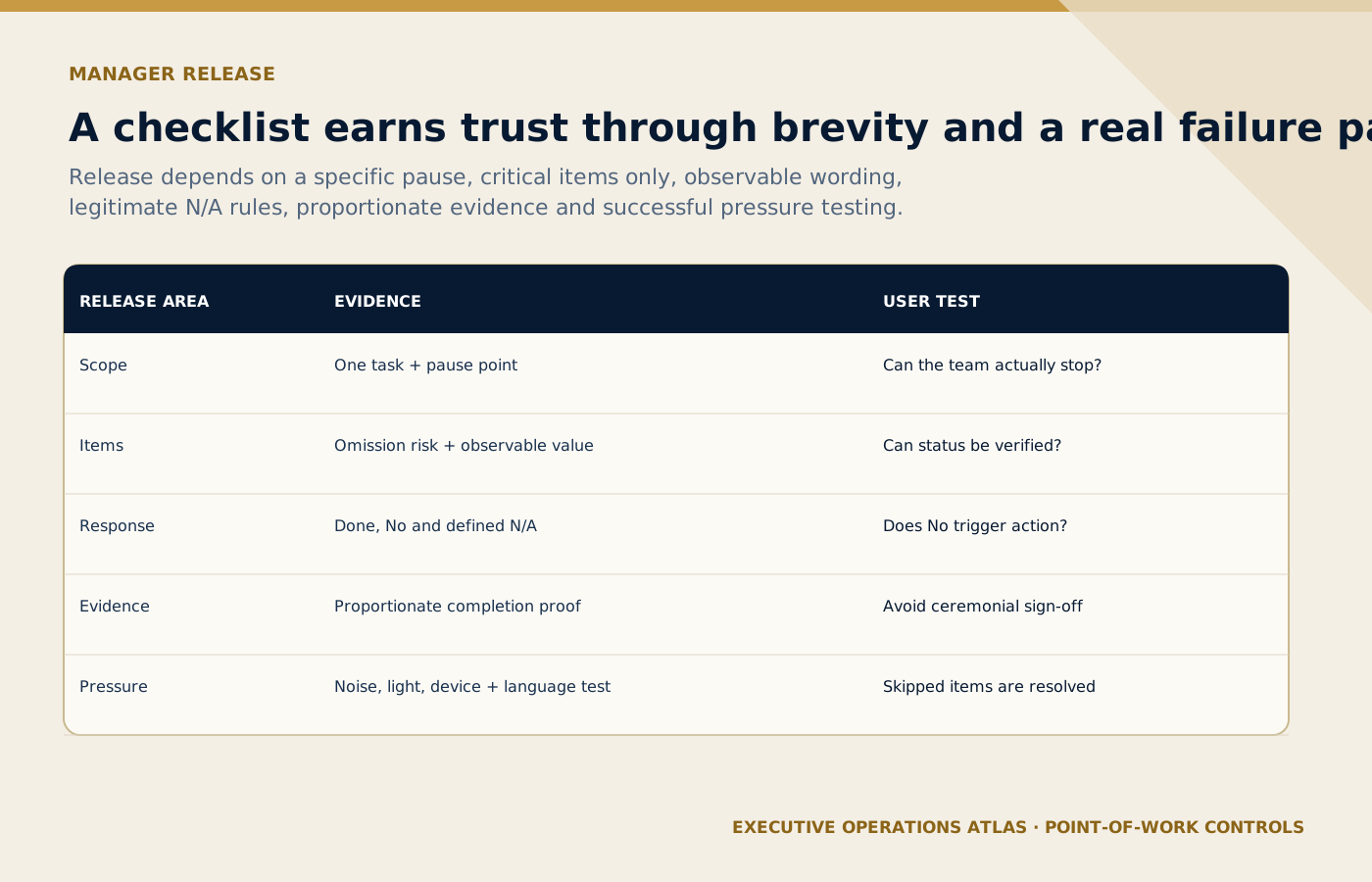
The checklist earns release through brevity, legitimate response options, proportionate evidence and successful use in operating conditions.
On small screens, scroll the diagram horizontally to read its labels.
#Manager's release checklist
- The purpose, boundary, users, owner, and approval authority are explicit.
- The content matches the approved process map, risk assessment, customer journey, and current systems.
- Roles, deputies, thresholds, evidence, privacy, accessibility, supplier interfaces, and exceptions have been tested.
- Supporting SOPs, work instructions, checklists, forms, templates, records, and training do not contradict one another.
- Representative users have completed a normal and exception scenario in the actual work environment.
- The release, access, version, change, retention, review, and withdrawal controls are ready before go-live.
#Sources and further reading
Primary standards, institutional guidance and professional references used to support this article.
- FAA — The Use and Design of Flightcrew Checklists and Manuals
- WHO Surgical Safety Checklist implementation manual
- ISO 10013:2021 — guidance for documented information
- ISO 10015:2019 — competence management and people development
Editorial note: This article provides operational and quality-management guidance for a professional portfolio. It does not provide legal, regulatory, privacy, safety, emergency, employment, or contractual advice. Apply qualified local review wherever those obligations affect the service.
Connect this guide to your next step
Continue with related methods and the wider series.
- Related guideHow to Use SIPOC in Tourism Operations
A practical way to set process boundaries, expose missing inputs, and agree what a tourism service must deliver before anyone writes the detailed SOP.
- Related guideHow to Write a Professional SOP: Part 2 — The Procedure
Turn policy intent and mapped work into instructions that identify the actor, action, sequence, decision, time standard, evidence, and exception path.
- Related guideHow to Write Work Instructions
Translate one technical or task-level activity into precise, user-tested steps with prerequisites, acceptance criteria, warnings, evidence, and a controlled route back to the SOP.
Put this article into practice
- Choose critical pause points, write observable checks and define what staff should do when a check fails.
- The purpose, boundary, users, owner, and approval authority are explicit.
- The content matches the approved process map, risk assessment, customer journey, and current systems.
- Roles, deputies, thresholds, evidence, privacy, accessibility, supplier interfaces, and exceptions have been tested.
Your next step
Use this connected method when you are ready to design fields that collect usable facts, guide decisions and become reliable records after completion.
Review How to Design a Professional Operational Form